Call & Text Add On
This allows you to set up text and robo-call reminders. Please follow the setup instructions closely. They are outlined below.
To see what all texting can do for your clinic, go here****.
In January 2023 new FCC requirements are in place. Businesses must register a profile and campaign to send business-related text messages. This is not an HQ thing, it's a federal requirement in the industry for any business that uses texting, no matter which texting service you use. If you use another texting service, we suggest you ask your text message provider if your campaigns are registered. If your clinic uses HQ texting, please complete your business profile in Settings. If you do not complete your business profile, some carriers may not push your text messages through to their clients. For example, text messages may not be deliverable to ATT clients, or TMobile clients.
Business Profile
THREE STEPS to register your Business Profile & Campaign
STEP 1: Fill Out Your Business Profile
Please go to Settings > Call & Text Add On and click the button to “Fill in Business Information.”
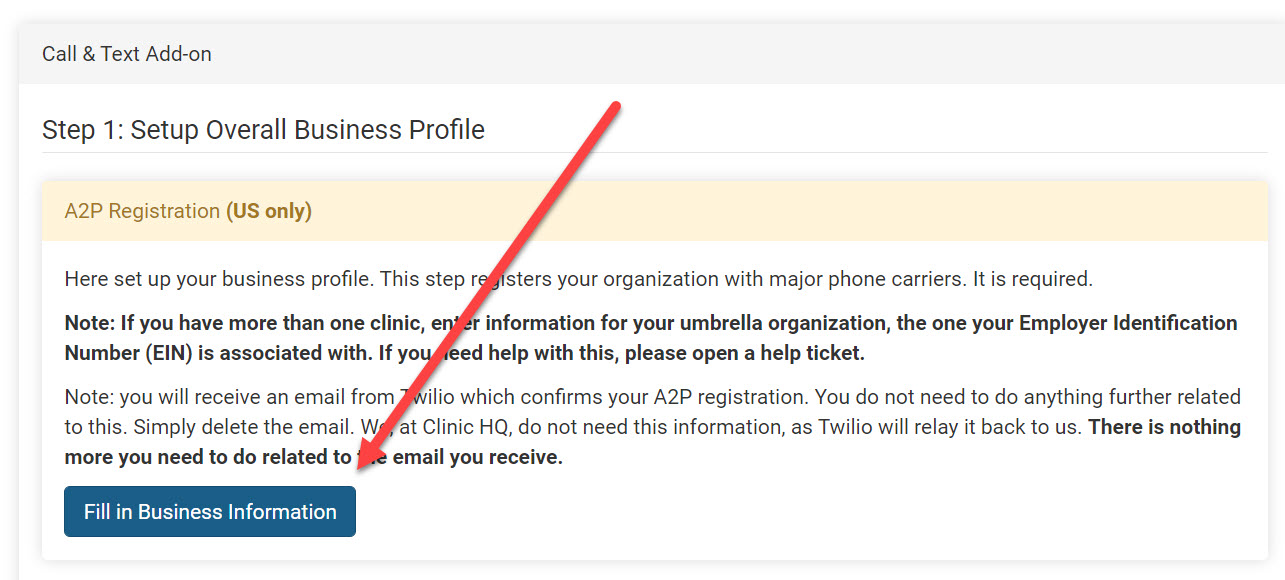
Enter Business Information Proceed with filling in the business information. Enter the EIN number, business details, and contact. It is common for the registered business name associated with the EIN number to be different than the day-to-day business name. If one period is out of place, it is declined. It’s a computer verifying the information
Having trouble with the business information being accepted? Twilio, our provider, independently checks this information character for character against IRS records. Please use your last year's tax return or 990 to verify details. If one period is out of place, it is declined. It’s a computer verifying the information. There is no room for interpretation.
If you still need assistance, please start a chat with Fin and ask to speak with a human agent for further assistance. In your request, please provide the following information.--- Unknown node: hardBreak ---Non-profits: EIN number, website, contact person (full name, email, phone, job position, title)
For Profit: A copy of last year's tax return (just the top contact information - no financial data), website, contact person (full name, email, phone, job position, title)
STEP 2: Submit Business Registration
Then, click Submit Business Registration. A field for US A2P BRAND STATUS will appear where it indicates pending or approved. Most clinics will see an approval within a few minutes. Refresh the page or check back after a bit.
Important: If your clinic has submitted the registration and does not have approval within 4 hours, please start a chat with Fin and ask to speak with a human agent for further assistance.
STEP 3: Complete Registration
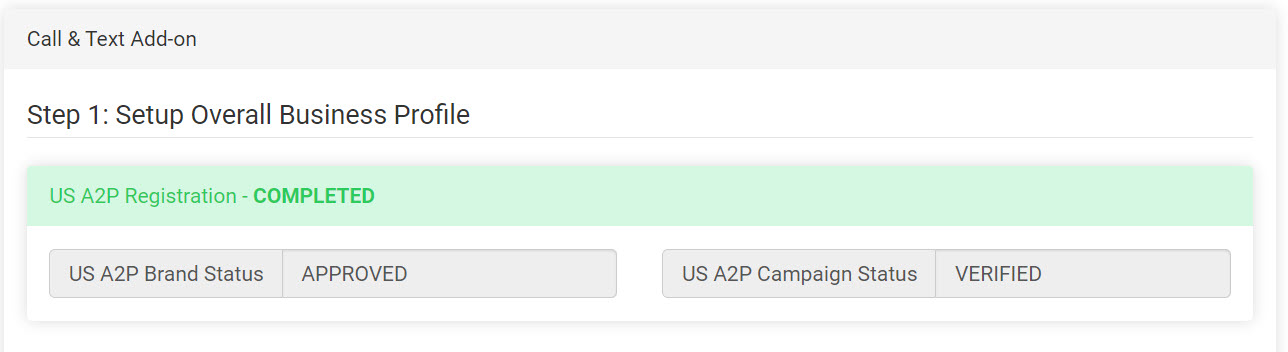
Once the US A2P Brand Status is "APPROVED," you must click the button beside the status and submit the campaign, by clicking Complete Registration.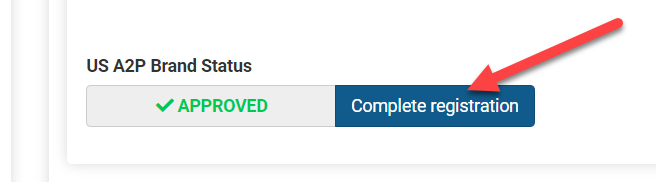
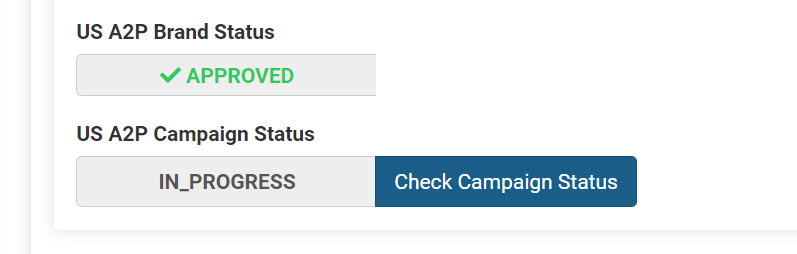
Campaign Status
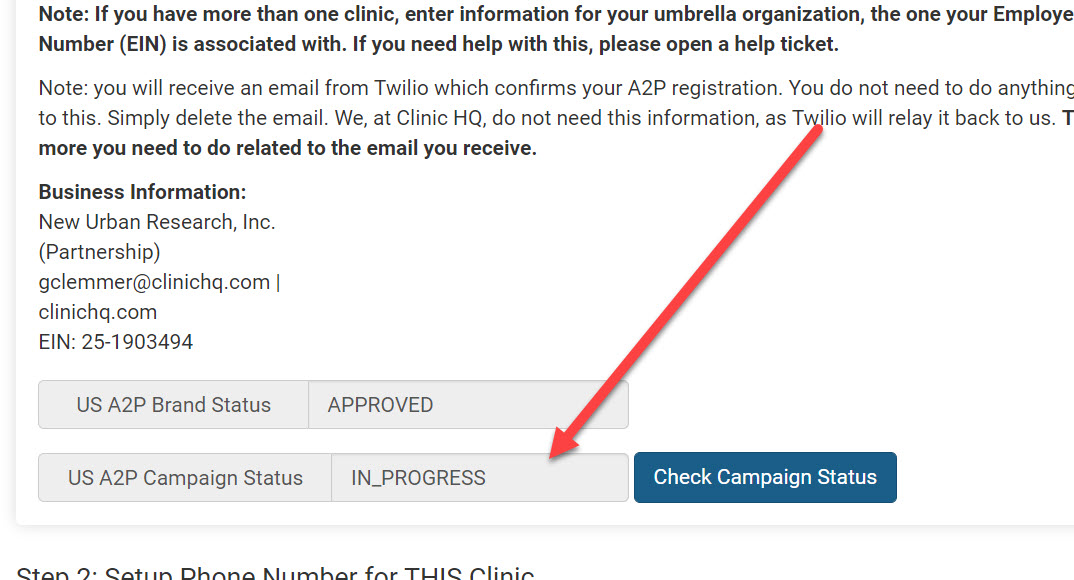
We will auto-register your "campaign." A campaign simply describes the nature of your text messages. By default, all clinics are registered a "business transactional." It should take about one minute for it to register the campaign. NOTE: Twilio has posted that due to the high demand, this process is taking longer than expected. Some users may not have an approved campaign for several weeks.
Once a phone number is selected, you must complete the A2P business registration form. After submission, your clinic should be approved to use the phone number within a minute.
Once the campaign is registered, refresh the page and you'll see a green "Completed" status indicator.
Enable a Phone Number
Select the phone number only after the brand and campaign are approved. We do not recommend enabling a phone before the campaign is verified. Once a phone number is selected, monthly charges for the add-on will begin.
In order to set this up, input your area code and click Enable. To disable it, click the red button.
Tip: Your clinic does not need a physical phone for the number to be connected with for Call & Text Add-On.
The Call & Text Add-on phone number is used to send communications from Clinic HQ and is not tied to a physical phone.
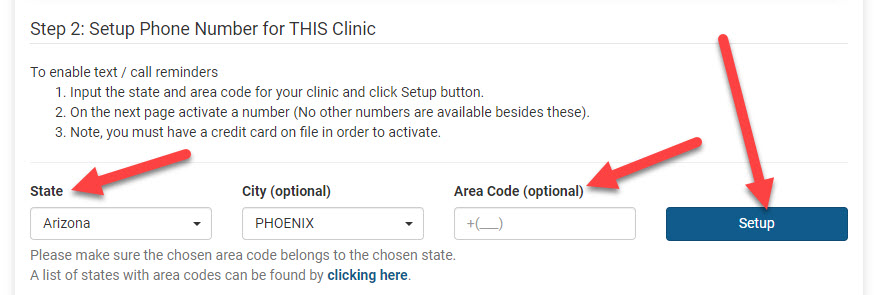
- Select your State.
- Select either a City OR enter an area code.
- Click "Setup" for the system to search available numbers. On the next page activate a number (No other numbers are available besides these). This will pull available phone numbers from the integrated Twilio system. Select the number you want to be associated with your clinic's text messages and robo-calls. This number is NOT your clinic's landline.
Note, that you must have a credit card on file in order to activate. The phone number is $1/month. Go to Profile > Billing & Subscription to ensure your clinic's billing information is active.
IMPORTANT: If your clinic chooses to disable the phone number, it cannot be recovered.
The Cost
The charge for text messages is 5¢ per segment. Each segment consists of up to 160 characters, including spaces. To reduce cost, shorten the message. The charge for auto-calls/robo-calls is 5¢ per segment. Each segment consists of up to one minute, which includes about 800 characters including spaces. To reduce cost, shorten the message.
The monthly fee is $1.00 per month for the phone number (in addition to the .05 cents per segment). Your clinic will be billed at the beginning of each month for the text and call add-on. This is separate from your clinic's subscription.
Note: The calculation is only an estimate and may not reflect actual length. The length of the message, with each message, will be slightly different based on changing the length of placeholder fields such as the animal name.
Go to your Confirmations and Reminders to set up automated texts or calls. Keep in mind that if the client has more than one pet on the same appointment date, they will only receive one text. If you choose to include fields in the reminder text such as animal name, this will populate with all of the animals for that day. You are then more likely to have a larger cost associated with that reminder.
Tip: To keep texting fees low, make sure your character count on a message stays below 160. An example reminder text that won't go over the character count: "Reminder for your pet's appointment tomorrow. Check-in is at 8 AM. Check your email for more instructions." Read more about setup in these sections of the manual: Confirmations & Reminders and Communications
Texting back and forth with clients.
This is done via the e-Lobby. If the client messages you, there is no charge. Only outgoing messages are billed to your clinic.
Estimating Texting Costs
Clinic HQ offers the cheapest texting of all veterinary and texting-based software, period. You WILL NOT find a cheaper option.
The charge for text messages is 5¢ per segment. Each segment consists of up to 160 characters, including spaces. To reduce cost, shorten the message. The charge for auto-calls/robo-calls is 5¢ per segment. Each segment consists of up to one minute, which includes about 800 characters including spaces. To reduce cost, shorten the message.
The monthly fee is $1.00 per month for the phone number (in addition to the .05 cents per segment). Your clinic will be billed at the beginning of each month for the text and call add-on. This is separate from your clinic's subscription.
Estimating Texting Costs
Appointment reminders
- Look at the number of patients you had on your last open day. Let's say it was 40.
- Now, since multiple pets can belong to one client, it's important to estimate how many unique clients you had. Let's say you had 10 unique owners that combined had 30 animals total. Plus, you had 10 animals coming in from a volume client. That means 11 unique clients.
- Now, multiply 11 times .05 cents. That equals 0.55 cents.
- Now write down what this was for: appointment reminders (assuming they only get one appointment reminder by text). Email is free.
Okay, so it costs 0.55 cents to send reminders to 40 patients. If you only used text for this purpose, you would now look at how many days you are open in a week. Let's say it's five. 5. Next, you'd multiply 0.55 cents times 5, which equals $2.75 cents per week. Assuming four weeks in a month, that's $11 per month to remind owners of 800 pets about their appointments. If you reduce ONE no-show, that covers the expense plus some!
Now, think about the next most common use of text messages: pick-up texts.
When you check patients out, HQ can text the owner that the pet is ready to be picked up. This is a massive time saver, improving safety and reducing stress because it staggers check-out. In this case, though, the text is per patient, so 30 of the patients are owned animals in this example. These are the ones you want to get the text. So 30 x 0.05 cents = $1.5 dollars x 5 days a week = $7.5 weekly x 4 weeks = $30.
If you just used texting for these circumstances, you'd pay $41 monthly. And you'd save hundreds of hours of staff time calling people to pick up their animals and reminding them of their appointments. If you have a bulk check-out, where they come at, say, 4 p.m., by enabling staggered checkout, you reduce stress for your staff, increase safety for pets and reduce the time pets stay in the clinic.
Note: Volume Client communication is free through the chat tool.
Now, let's say you want to use it to communicate with owners via text about various issues. Realistically, you might get three text messages a day (which are free to receive), and your staff might reply to each of these. That's .015 cents, which equates to $3 a month for the week.
Lastly, let's say you want people to be able to look up their medical records online and text a copy to themselves. That might be another $3.00 per month.
So, around $45 to $50 per month to use ALL texting features is a reasonable estimate.
How We Save You Money
Bundling
We bundle text messages with the owner via integrated texting in every possible circumstance.
Example: Jax and Max are due for a rabies 1 year vaccine. You have the Item Reminders set to send the owner a text. The message is bundled into one text costing .05 cents that includes both animals, instead of two texts costing .10 cents, one for each animal. It’s possible you may not immediately recognize the complexity of this,nor its benefit for your clinic in terms of cost savings. But know this, it’s crucial. Text messaging costs will double or triple without it.
Character Counts
In all instances, we show you how many characters you are typing. That’s because phone carriers charge per segment. The segments can be 160 characters long. If it’s 161 characters, it counts as two text messages. We want you to spend as little as possible on these fees, so we intentionally give you the character counts on text messages as you type them.
No Monthly Fee
We do not charge any monthly fee for the texting service. You pay for what you use on the 2nd of each month.
All good points, but it still costs money
It’s true, a text message costs .05 cents to send. And when you see it in black and white like that, it’s easy to dismiss it and think – we can’t pay another cent for one more thing. We totally get that. But here comes the cold water. You still have to pay real money in the form of a wage to your staff. The money will be spent either way and requiring your staff to spend their precious time performing easily automated, mundane tasks is soul-numbing.
Let’s look at the example of medical record requests. Let’s say six clients call per week, and Jane, your Client Service Representative, handles those requests. Talking to the client, looking up the records and emailing a copy to each client, let’s say, takes ten minutes. So, one hour was spent doing a mundane task.
Instead, your clinic could put the Medical Records Request link on your website and have the clients use the automated system to get copies of their medical records. The time spent would be zero minutes, and your organization would pay .30 cents.
Let’s say Jane gets paid $15 per hour. For Jane to keep fulfilling the requests would cost $780 in wages and fifty two hours of staff time per year – a full work week just for completing this task. Texting would cost $15.80 for the year to automate this task.
You’ve saved money, and Jane’s partner is happy that she no longer comes home each night and complains about her job.