Vaccine Setup
Vaccine Setup
The Vaccine Setup section is used to enter information for the rabies vaccines your clinic uses. This information is required to generate rabies certificates.
Creating a rabies vaccine allotment
- Go to Settings > Vaccine Setup.
- Click +Create New Allotment.
- Enter the required fields using the details from the vaccine lot.
Here are what each field means:
- Clinic Item: The service item associated with this allotment. When this item is entered, the system will recognize that a rabies certificate must be generated. Ensure you select the correct item for your vaccine. Example: Rabies 1 Year Vaccine.
- Manufacturer: The manufacturer listed on the vaccine label. Once selected, the Product field will populate. If the correct product is not available, select a different Clinic Item or start a chat with Fin and ask to speak with a human agent for further assistance to request the product.
- Product: The specific vaccine name from the selected manufacturer. For example, the Manufacturer may be Boehringer Ingelheim and the product IMRAB 1.
- Tag Type: The duration of the rabies certification.
- Appointment Type: The appointment category this allotment applies to. Options include Spay/Neuter, Wellness, Recheck, or All.
- Rabies Lot Number: Lot number printed on the vaccine.
- Expiration Date: Expiration date printed on the vaccine.
Note: If your clinic does not issue rabies tags, then select no tag numbers here.
Managing Rabies Vaccine Lots
When your clinic starts using a new vaccine lot, edit the existing allotment and update the details. Rabies certificates are locked once generated, so changes to an allotment will not affect certificates already issued.
Most clinics will have only one active lot at a time. If multiple lots exist, you will select the allotment that matches the vaccine administered to the animal when generating the certificate.
Volume Client Provided Rabies Vaccine
If your clinic administers rabies vaccines provided by a volume client, you will need to create a second allotment for the same Rabies 1 Year Clinic Item. When creating the lot, enter the details of the client's vaccine. You can set a VC Custom Price for the Rabies 1 Year line item if the administration fee is different under Settings > VC Custom Pricing.
When generating certificates, select the allotment that corresponds to whether the clinic vaccine or the client-provided vaccine was used.
Rabies vaccines are unique because they generate certificates. A separate line item cannot be created to distinguish clinic-provided versus client-provided vaccines. Since your clinic administers the vaccine, you must use the standard Rabies 1 Year service item and differentiate only by allotment.
Non-Rabies Vaccines
Clinic HQ's "Vaccine Setup" is only for generating certificates for rabies vaccines. If your clinic is looking for ways to document the details of other vaccines, we have provided some options here.
Documenting Other Vaccines
There are several ways to record non-rabies vaccine details, depending on your printing and reporting needs.
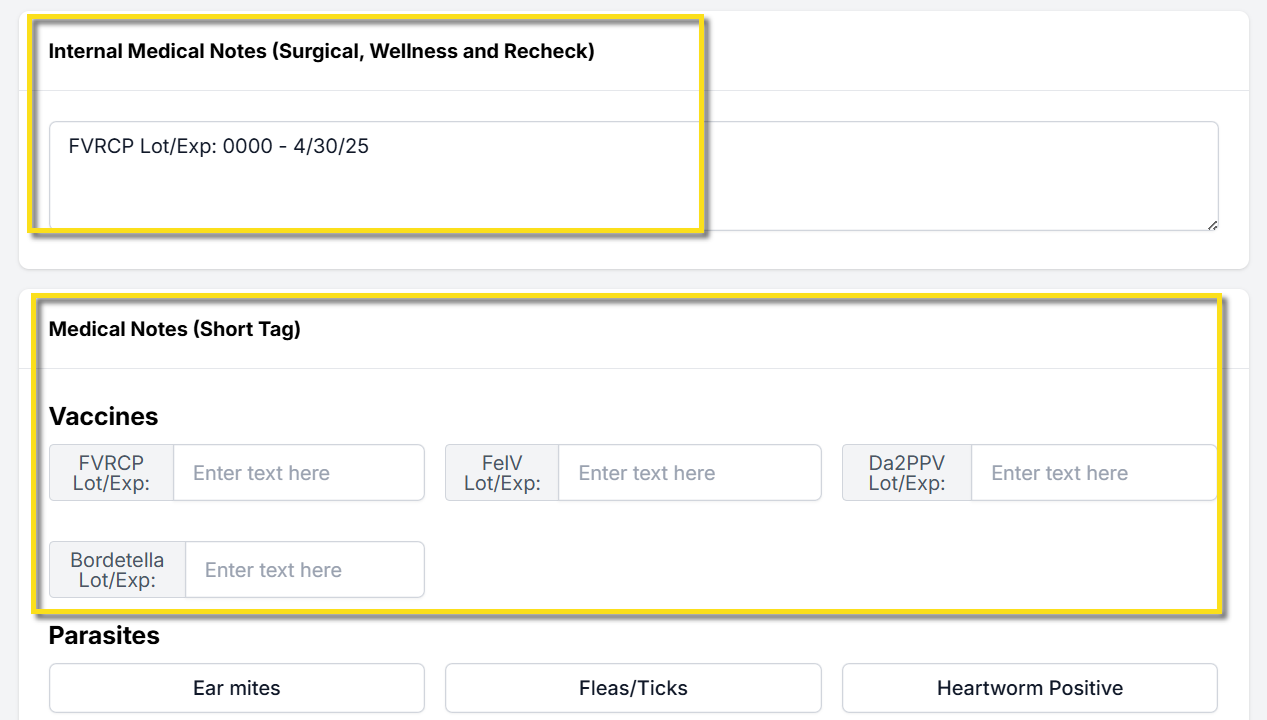
- Manually enter the vaccine lot number and expiration date in the Internal Medical Notes field. This option requires no setup and appears in the patient’s medical record. Reporting capabilities are limited.
- Create custom fields to record lot numbers and expiration dates for each vaccine. These fields are created as Medical Notes (Short Tag). They appear as text boxes in areas such as the Exam and Patient Flow. Data can be queried and exported using a custom Excel report and you can use custom merge fields to populate this information on custom templates.
- If your clinic uses paper treatment sheets, attach the vial sticker to the animal’s record. Scan and upload the sticker to the Documents section of the appointment.
Creating Custom Fields for Other Vaccine Lot & Expiration Details
Create the Custom Field Group
- Go to Settings > Custom Field Groups > +Create New Group
- The new group Name is "Vaccines."
- Tick the box for Is Medical.
- Save.
Create the Field
Go to Settings > Custom Fields > Create New Field. You will create a field for each vaccine type.
- Name: Specific Vaccine Type + "Lot/Exp" (e.g. FVRCP Lot/Exp)
- Group: Vaccines
- Control Type: Textbox
- Input Mask: (leave empty)
- Description: (same as name)
- Tick boxes: (nothing should be selected)
- Appointment Type: All
- Template Hint: Vaccine Name, like "FVRCPLotExp" (do not use any numbers, spaces, or special characters.)
- Display Order: Where this field sits in Vaccine group.
- Status: Active. Save your Settings.
Other Vaccine Due Dates
Clinic HQ does not support automatic due dates for non-rabies vaccines. To track when other vaccines are due, use service items with effectiveness durations.
In Settings > Services and Products, find line items that include the vaccine name and how long it is effective.
Examples of common line items include the following:
FVRCP vaccine booster 3 to 4 weeks, FVRCP vaccine 1 year, FVRCP vaccine 3 yearDAPPV booster 3 to 4 weeks, DAPPV 1 year, DAPPV 3 year
Communicating Due Dates
Using unique line items with duration details allows additional client communication.
- Configure Item Triggered Notes in Settings > Medical Notes to explain when the next vaccination is due.
- Create Item Reminders so clients receive email or text notifications when their pet is due for vaccines again.
Vaccine History
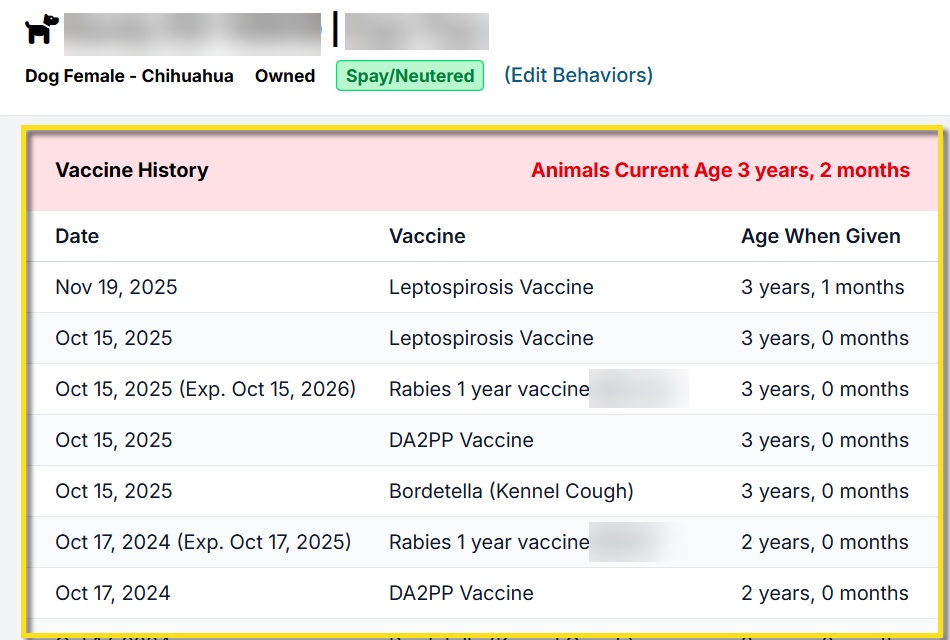
Internally, clinic users can review a patient's vaccine history by clicking on the plus icon next to the animal's name. Here you can see when vaccines were administered to determine if they are due.
Client Provided Rabies Vaccines
Navigating Client-Provided Rabies Vaccines
Due to federal regulations, we cannot change the rabies vaccine name (e.g., by adding "client provided") on the rabies certificate. The vaccine name and manufacturer must match exactly what is on the certificate to remain compliant.
If you charge differently when a client provides their own vaccine, you can update pricing for that client:
- Go to Settings > VC Custom Pricing
- Set a custom price for the rabies vaccine for that client
- This will override the default or package pricing in any new appointments. If an appointment is scheduled, you will need to remove and add the item back in for pricing to update.
Important note on safety: Vaccines brought in by clients may not have been stored properly (kept cold). Since vaccine effectiveness and safety rely on correct storage, it is not best practice to use client-supplied vaccines.
Optional Workaround for Tracking: If needed, you can:
- Create a custom field to track when a rabies vaccine was provided by the client
- Use an item like "Client Provided Vaccine" in the appointment
- Add a note that the rabies vaccine was provided by the client
Certificate Requirement:
The system will still require a rabies certificate to be generated at checkout. If you are not issuing one, using the above method is the best alternative.
We know this may be limiting, but following vaccine regulations and ensuring animal safety is essential.
Too Young for Rabies
Rabies Vaccines Administered to Patients Too Young for Certification
In certain cases, rabies vaccines may be administered off-label to patients that are too young to qualify for a valid rabies certificate. Because rabies vaccines are strictly regulated, their product names must align with official regulatory standards. As such, we cannot add line items with alternate names to cover this use case. Instead, we suggest following the ASPCA's protocol for rabies vaccines where no certificate is issued due to age.
Rabies Vaccines - No Certificate Issued Protocol
- Use the standard rabies vaccine service item on the appointment (when the vaccine is still administered).
- Use a custom medical short note to document that no certificate is to be issued due to age.
- This note will appear in the external client communication field and will ensure clear documentation for both staff and clients.
Setting up the Custom Field Medical Note
A custom medical note can be created to inform owners if the vaccine was administered and no certificate was issued, or if the vaccine was not administered due to age. Here's how to set that up:
- Go to Settings > Custom Fields.
- Click Create New Field.
- Add the field title, such as "Too Young for Rabies".
- Assign the field to an existing medical custom field group, such as Biological, or create your own medical group.
- Set the Control Type to Dropdown list.
- Fill in the other field prompts.
- Add the dropdown values. In the Value column, enter an option for if the vaccine is given, but no certificate is issued and one for when the vaccine is not given.
- Enter a description for each value. This is what will be generated on their take home paperwork.
- Save your custom field. Check out our detailed guide on creating custom fields HERE.
Here's an example of what these notes can look like:

Once you have created the field, you will now be able to apply it to appointments via the Medical Notes Short Tag sections in Patient Flow. Selecting the medical tag will auto-fill the description you entered during your custom field setup to the External Client Communication field and take home paperwork. Lastly, we recommend combining your rabies certificates into the Visit Summary/Take home paperwork, rather than issuing a standalone certificate for increased efficiency.