24.8.2. Non-Rabies Vaccines
Clinic HQ's "Vaccine Setup" is only for generating certificates for rabies vaccines. If your clinic is looking for ways to document the details of other vaccines, we have provided some options here.
Documenting Other Vaccines
There are several ways to record non-rabies vaccine details, depending on your printing and reporting needs.
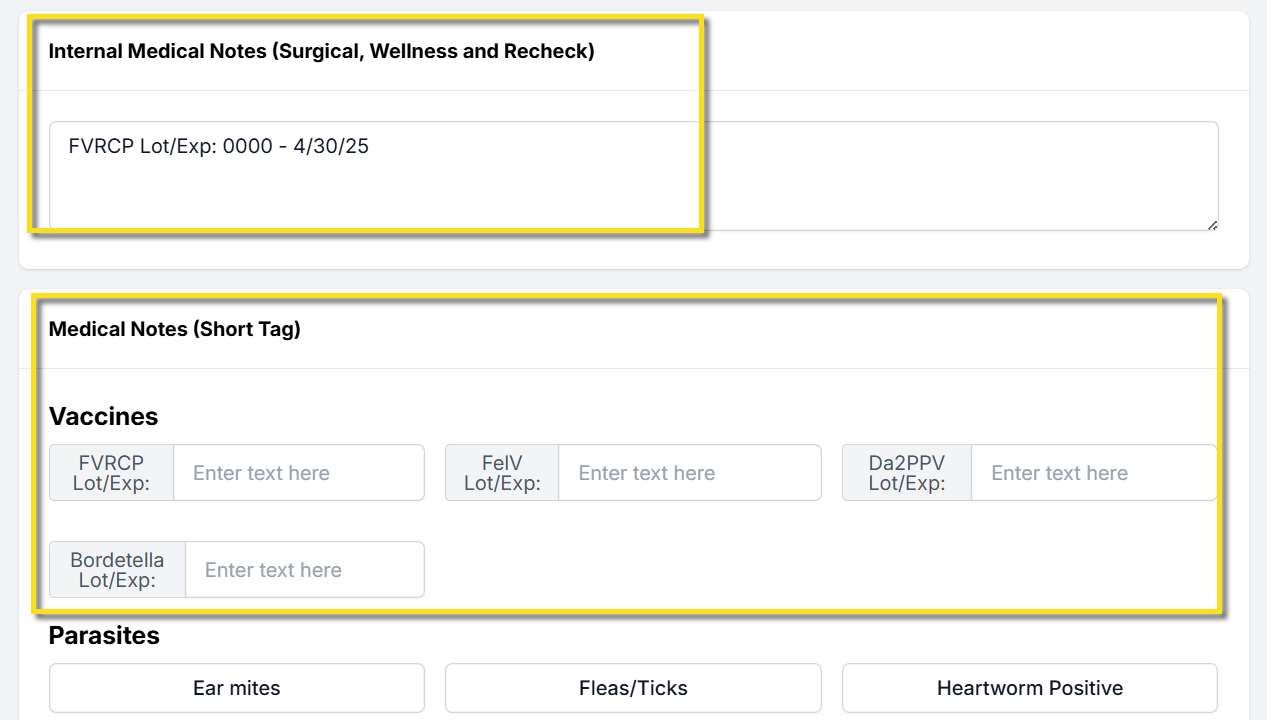
- Manually enter the vaccine lot number and expiration date in the Internal Medical Notes field. This option requires no setup and appears in the patient’s medical record. Reporting capabilities are limited.
- Create custom fields to record lot numbers and expiration dates for each vaccine. These fields are created as Medical Notes (Short Tag). They appear as text boxes in areas such as the Exam and Patient Flow. Data can be queried and exported using a custom Excel report and you can use custom merge fields to populate this information on custom templates.
- If your clinic uses paper treatment sheets, attach the vial sticker to the animal’s record. Scan and upload the sticker to the Documents section of the appointment.
Creating Custom Fields for Other Vaccine Lot & Expiration Details
Create the Custom Field Group
- Go to Settings > Custom Field Groups > +Create New Group
- The new group Name is "Vaccines."
- Tick the box for Is Medical.
- Save.
Create the Field
Go to Settings > Custom Fields > Create New Field. You will create a field for each vaccine type.
- Name: Specific Vaccine Type + "Lot/Exp" (e.g. FVRCP Lot/Exp)
- Group: Vaccines
- Control Type: Textbox
- Input Mask: (leave empty)
- Description: (same as name)
- Tick boxes: (nothing should be selected)
- Appointment Type: All
- Template Hint: Vaccine Name, like "FVRCPLotExp" (do not use any numbers, spaces, or special characters.)
- Display Order: Where this field sits in Vaccine group.
- Status: Active. Save your Settings.
Other Vaccine Due Dates
Clinic HQ does not support automatic due dates for non-rabies vaccines. To track when other vaccines are due, use service items with effectiveness durations.
In Settings > Services and Products, find line items that include the vaccine name and how long it is effective.
Examples of common line items include the following:
FVRCP vaccine booster 3 to 4 weeks, FVRCP vaccine 1 year, FVRCP vaccine 3 yearDAPPV booster 3 to 4 weeks, DAPPV 1 year, DAPPV 3 year
Communicating Due Dates
Using unique line items with duration details allows additional client communication.
- Configure Item Triggered Notes in Settings > Medical Notes to explain when the next vaccination is due.
- Create Item Reminders so clients receive email or text notifications when their pet is due for vaccines again.
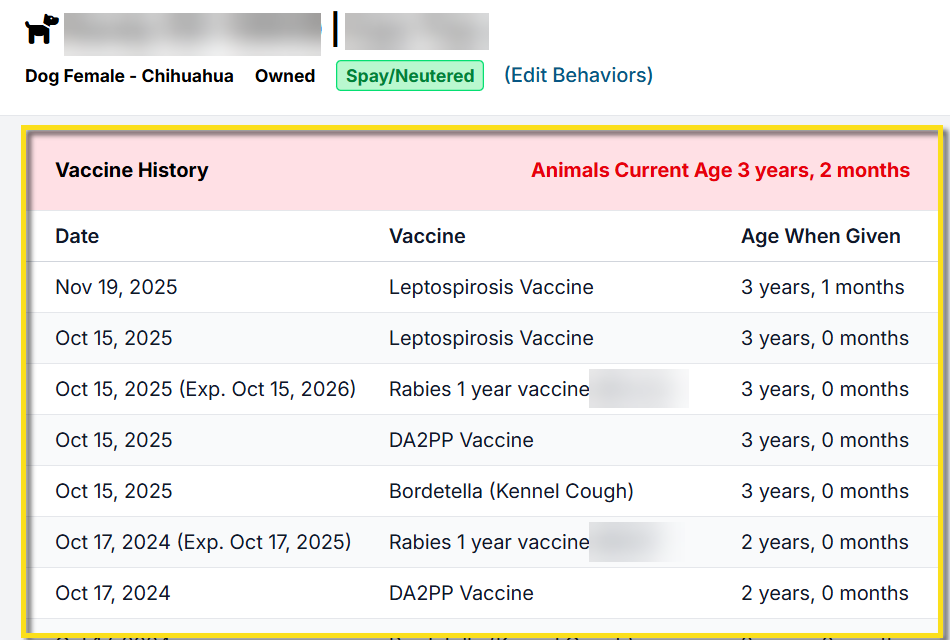
Vaccine History
Internally, clinic users can review a patient's vaccine history by clicking on the plus icon next to the animal's name. Here you can see when vaccines were administered to determine if they are due.