Settings Overview
Configure all HQ settings: calendar, pricing, users, communications, and more.

Understanding Settings in HQ
Settings are the foundation of your Clinic HQ application. The calendar, email reminders, pricing, and nearly every critical function in HQ are driven by what your clinic configures in the Settings section.
If the calendar is not behaving as expected, adjust it in Settings. If pricing is incorrect for a vaccine or service, update it in Settings.
To access Settings, scroll to the bottom of the left-hand navigation menu and click Go to Settings.
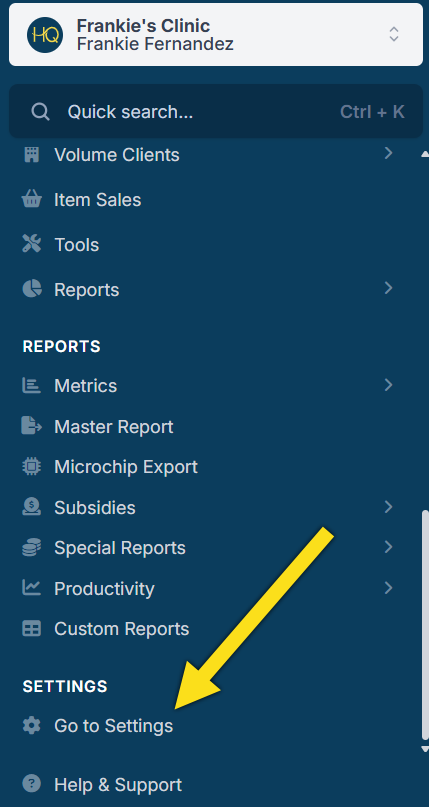
If you do not see this option, your user role may not have permission to view or modify Settings. Contact your HQ Admin to confirm access.
Opening Settings displays a list of sub-sections. The sections below explain what each area controls.
Settings
| Clinic Profile | Your clinic’s information and preferences, including customizable text on HQ’s default templates. |
|---|---|
| Users | Add, remove, and manage users, roles, and access permissions. |
| Vets | Add and edit veterinarian information, schedules, and surgical profiles. |
| Services and Products | Add and edit services, products, and OTC items, and set default pricing. |
| Packages | Bundle services and items for quick selection. |
| Custom Fields | Create custom fields used for reporting, e-appointment questions, and medical quick notes. |
| Tags | Configure client and animal behavior tags. |
Medical
| Vaccine Setup | Configure rabies vaccine allotments and certificate settings. |
|---|---|
| Divvy Setup | Create surgical teams and animal groups for Patient Flow. |
| Patient Flow Setup | Create drug protocols, enable controlled drug logging, and manage controlled substance container logs. |
| Medical Notes | Create reusable notes for external client communication and link them to items, drugs, and actions. |
| High Risk Waiver Setup | Configure your clinic’s High Risk Waiver script for verbal authorization. |
| Prescription Labels | Create prescription labels by linking items to prescription descriptions. |
| Microchips | Set a default microchip provider and enable auto-registration if supported. |
Scheduling
| Capacity Management | Set default capacities for spay and neuter surgeries. |
|---|---|
| Wellness Settings | Manage appointment types and rooms for the Wellness Calendar. Full guide: Setting Up Wellness. |
| Templates | Create paperwork templates that auto-fill client, patient, and appointment data. |
| E-Appointments | Manage appointment types available for online booking and access your scheduling link. |
| E-Payments | Configure integrated credit card processing and customize e-payment request emails. |
| Mobile Locations | Manage mobile clinic locations. Available only if enabled in Clinic Profile preferences. |
Communications
| Confirmations and Reminders | Create and manage automated communication templates for email, text, and robocalls. |
|---|---|
| Email Attachments | Upload files to include with confirmation and reminder messages. |
| Medical Record Requests | Configure automated medical record requests for clients. |
| Call and Text Add-On | Register your clinic and obtain a phone number for automated communications. |
| e-Lobby | Configure auto-responder texts and e-Lobby restrictions. |
| Invoices | Customize volume client invoice email templates. |
Accounting
| Donations | Configure donation widgets and online donation goals. |
|---|---|
| Funding Partnerships | Manage invoiced and funding pot partnerships and track grant usage. |
| Subsidies | Configure subsidies used to apply discounts from funding partnerships. |
| Grantors | Manage grantor organizations. |
| VC Custom Pricing | Set custom pricing rules for specific volume clients. |
| Tax Info | Configure taxable items and tax percentages. |
| QuickBooks | Set up item codes for QuickBooks integration. |
Integrations
| Idexx Setup | Add Idexx VetConnect credentials to order tests and retrieve results. |
|---|---|
| Shelter AddOn | Enable Shelterluv or PetPoint integration using an API key. Additional subscription required. |
All Clinics
| Chat | Enable or disable chat functionality. |
|---|---|
| OneLink E-Appointments | Create and manage unified e-appointment links for multi-clinic accounts. |
| VCP Settings | Manage Volume Client Portal permissions and paperwork options. |
| The Vault | Configure automated roster email backups in case of downtime or connection issues. |