23.7. Security

Keeping your HQ account safe
What can I (the user) do to ensure the content is secure?
- Keep your Chrome browser up to date
- Create limited user roles and do not share user logins..
- Use Two-Factor Authentication.
- Review our manual page on Preventing Data Breeches.
What does Clinic HQ do to ensure the content is secure?
Read more on this in the Privacy Policy
User Roles & Anti-Theft Measures
To prevent employee theft, there are two important things you can do:
1. Restrict Payment Removal Permissions
- Limit the ability to remove payments to a single trusted individual.
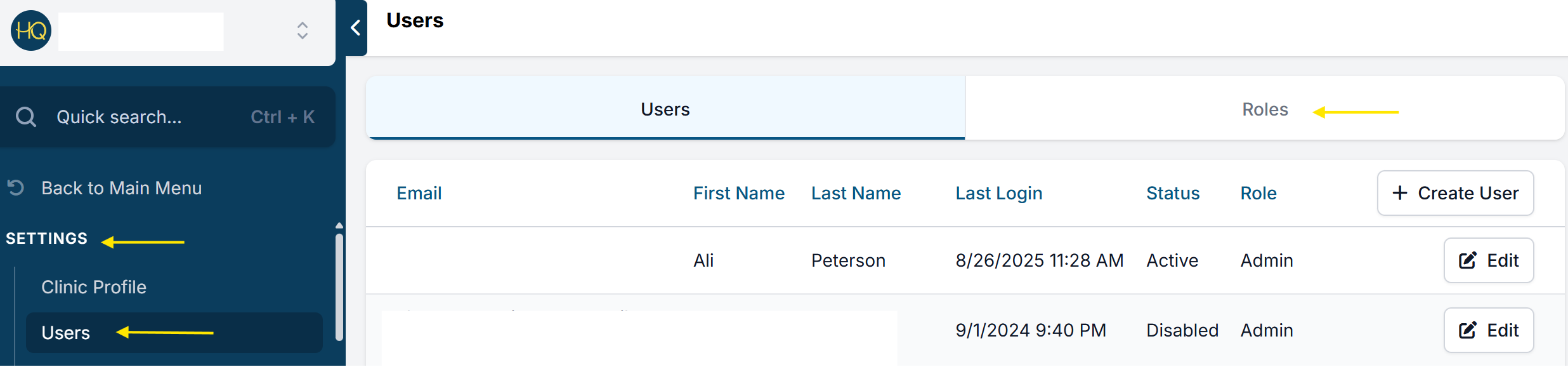
- Go to Settings > Users > User Roles.
- Create a new role (e.g., Accounting Admin).
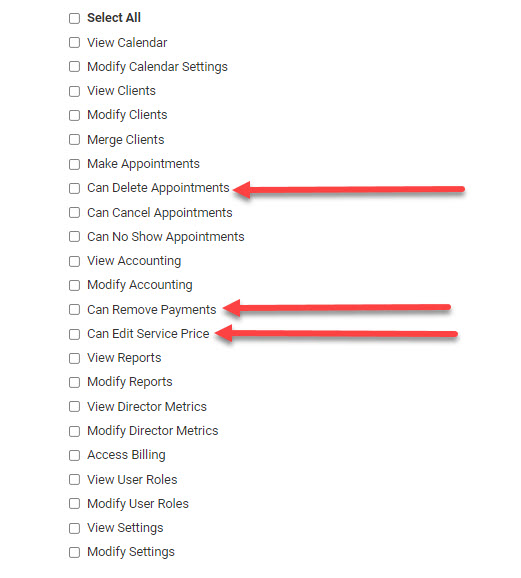
- Enable all privileges, including "Remove Payments".
- Assign only one person to this role, typically a manager or trusted accounting staff member.
This ensures that any payment removal must go through an authorized individual. All other staff members should be assigned roles without the ability to remove payments. This creates a necessary control point and accountability for any adjustments to payments.
Consider which of these specific roles everyday users should have access to:
See our full page about user roles HERE
2. Reconciling Bank Deposits
At the end of each day, you should run the reconciliation report and count what you have in the cash drawer plus your credit card receipts to make sure everything balances out. Then put the following protocols in place:
- A manager should print the recon report and initial next to the totals to confirm everything is balanced at the end of the day.
- Then fill out a bank deposit slip for the same amounts.
- Photocopy the slip and attach it to the printed recon pages, and put it in a three-ring binder.
- Paperclip the bank deposit slip and money together and store it in an appropriate place until a manager is ready to make the bank deposit.
- Manager makes the deposit and gets the receipt from the bank, then attaches the receipt of the same deposit amount to the recon slip copy bundle.
- For each deposit, there should be a print of the recon report, a photocopied deposit slip, and ultimately a bank receipt of that deposit.
- Every month, the accounts person should go in and pull up the deposits via the bank software and again confirm the amounts deposited.
See more about reconciliation HERE and how to run reports for them HERE