Drug Logs

HQ's drug log system provides DEA-compliant controlled substance tracking. This section covers starting the daily log, drawing and wasting drugs, closing the log, and troubleshooting common issues.
Starting the Drug Log
The very first thing a clinic must do each day is pull drugs out of the drug safe and START THE DRUG LOG.
⚠️ **Critical Reminder:**NO PART OF PATIENT FLOW WILL WORK WITHOUT STARTING THE DRUG LOG!
Starting the Drug Log Using the Centralized Model (Most Common)
- Go to Medical > Drug Logs.
- Click the blue Start Day button.
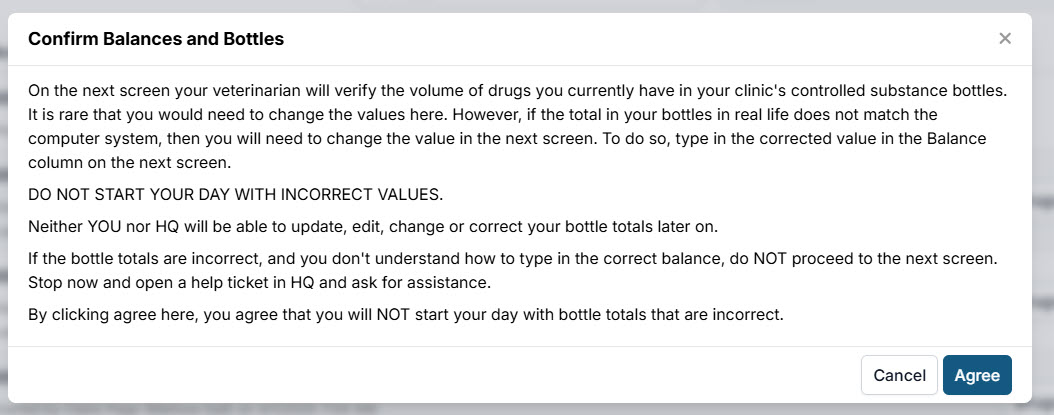
- Read and agree to the acknowledgment.
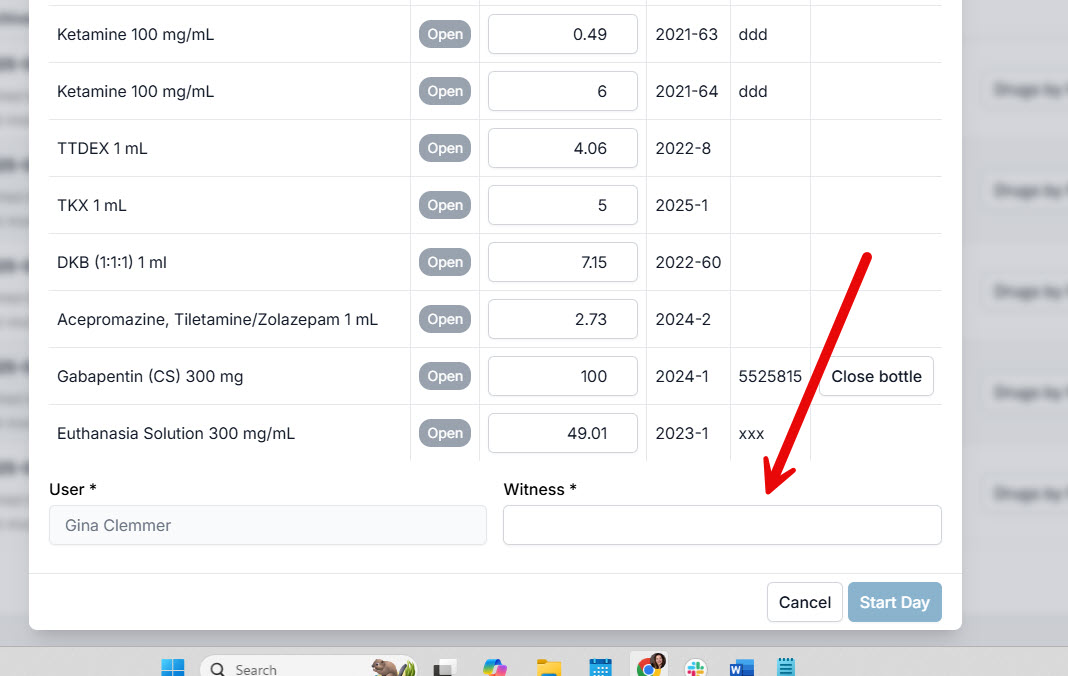
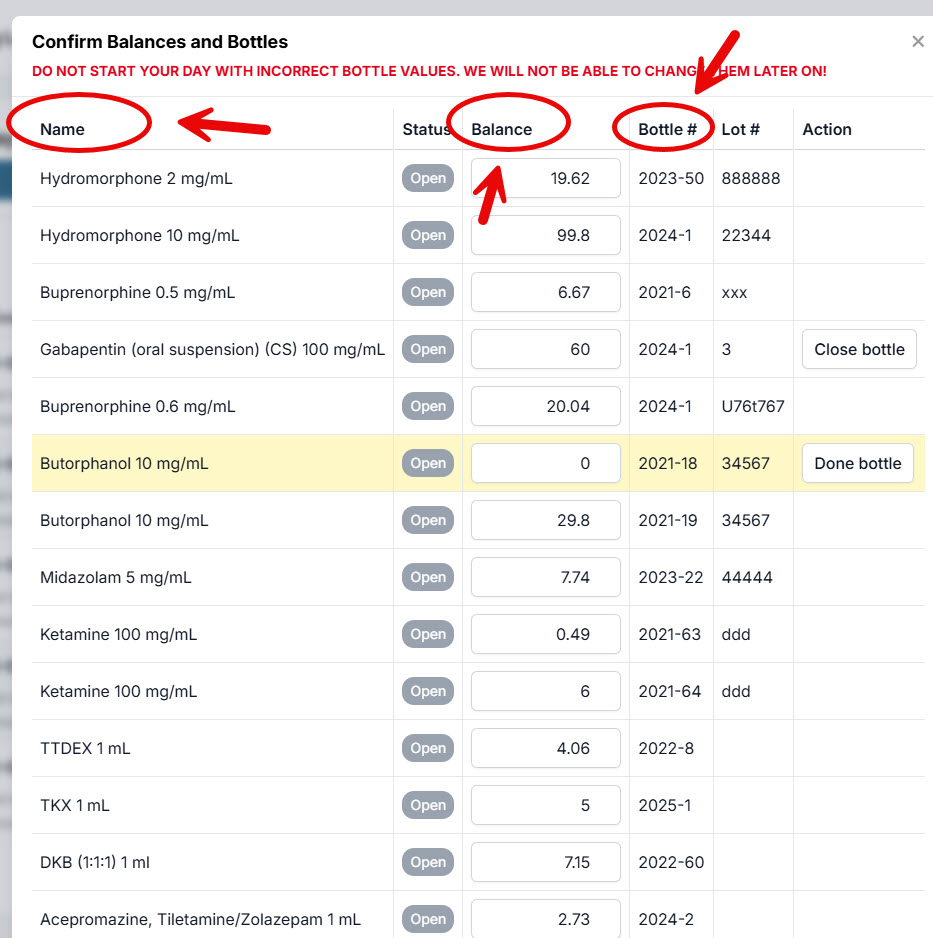
- Confirm bottle balances: review the drug name/concentration, balance, and bottle number for each bottle.
- Enter witness initials. This can be one or more people who helped pull bottles and verify totals.
Decentralized Method (Rare)
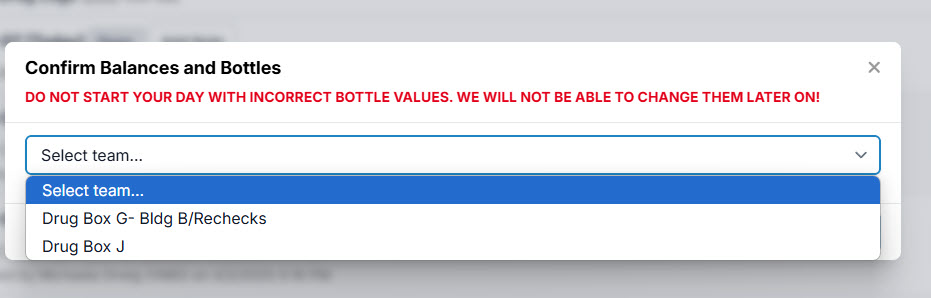
The steps are the same as above, except that when you start the drug log, each team begins their own log by selecting their team in the dropdown after clicking Start Team Drug Log.
Teams are configured in Patient Flow Setup
Centralized vs Decentralized Drug Drawing
In HQ, most clinics use a Centralized drug draw. This means one person (or a small team) is responsible for pulling up the drugs.
- Typically, one or two people draw up the induction drugs for the entire clinic.
- This could be a veterinarian or an LVT under the supervision of a veterinarian.
- Note: This does not refer to pre-med drugs, which are given at the time of exam. It specifically refers to induction drugs listed in Patient Flow under the Drug Draw screen.
Decentralized Drug Draw
The opposite method is a Decentralized drug draw.
- Here, smaller teams each manage their own set of drugs.
- Each team maintains its own drug log for the patients they serve.
- Instead of one central supply, multiple baskets of drugs are pulled out — one per team.
- This method is rare, but it is used by the ASPCA Spay/Neuter Alliance, where four surgical teams handle about 100 pets per day. Each team manages its own drug log.
Which Method Should You Use?
It depends on when and how your induction drugs are drawn up:
- If one person draws up induction drugs and distributes them to multiple teams → this is still Centralized.
- If multiple teams are fully responsible for drawing up and logging their own induction drugs → this is Decentralized.
Who Should Start the Drug Log?
Regulations on starting and maintaining drug logs vary by state. In HQ, there are three possible options for pulling drugs from the safe and starting the drug log:
- A veterinarian pulls the drugs and starts the HQ drug log.
- A technician pulls the drugs and starts the HQ drug log.
- A veterinarian and a technician pull the drugs together and start the HQ drug log.
The person (or people) who verify the drugs are the ones whose initials you enter. These initials will then appear on the drug log as the official record of who started it.

Confirming AM Bottle Balances
Why Do You Have to Confirm Bottle Balances Every Morning?
Every state requires veterinary clinics to maintain accurate drug logs for controlled substances. At a minimum, you must verify the starting totals each morning. Here's why:
- Preventing theft: By confirming that the morning bottle balances match those recorded the previous evening, you guard against the unlikely — but possible — risk that someone tampered with bottles overnight.
- Starting out right: Morning confirmation establishes the official daily starting values for controlled substances, as required by law. It also ensures accurate math throughout the day. As drugs are drawn, the system deducts amounts from these starting values. If you begin correctly, the calculations will remain correct through to the end of the day.
What Are You Looking At in the Pop-Up?
- You are viewing all open controlled substance bottles in your safe.
- Pull each one out and check that the system's recorded amount is close to what's actually in the bottle.
How to Confirm Bottle Amounts
You do not need to measure the exact contents (which could contaminate the bottle). Instead, confirm that the amount in HQ is approximately correct. You can:
- Eyeball it: Experienced veterinarians or technicians can easily verify approximate volumes (e.g., "Yes, there's about 3 mLs in here").
- Use a drug bottle ruler: For greater accuracy, compare the measured volume with the HQ record.
What If the Amount Doesn't Match HQ?
The morning value is copied from the previous day's finalized log. If the bottle doesn't match, there are only two explanations:
- Theft: Someone removed drug volume overnight.
- Error: The PM staff finalized the drug log without properly confirming balances. This is unacceptable — bottle amounts must be verified against HQ before finalizing.
Finalizing From the Day Before
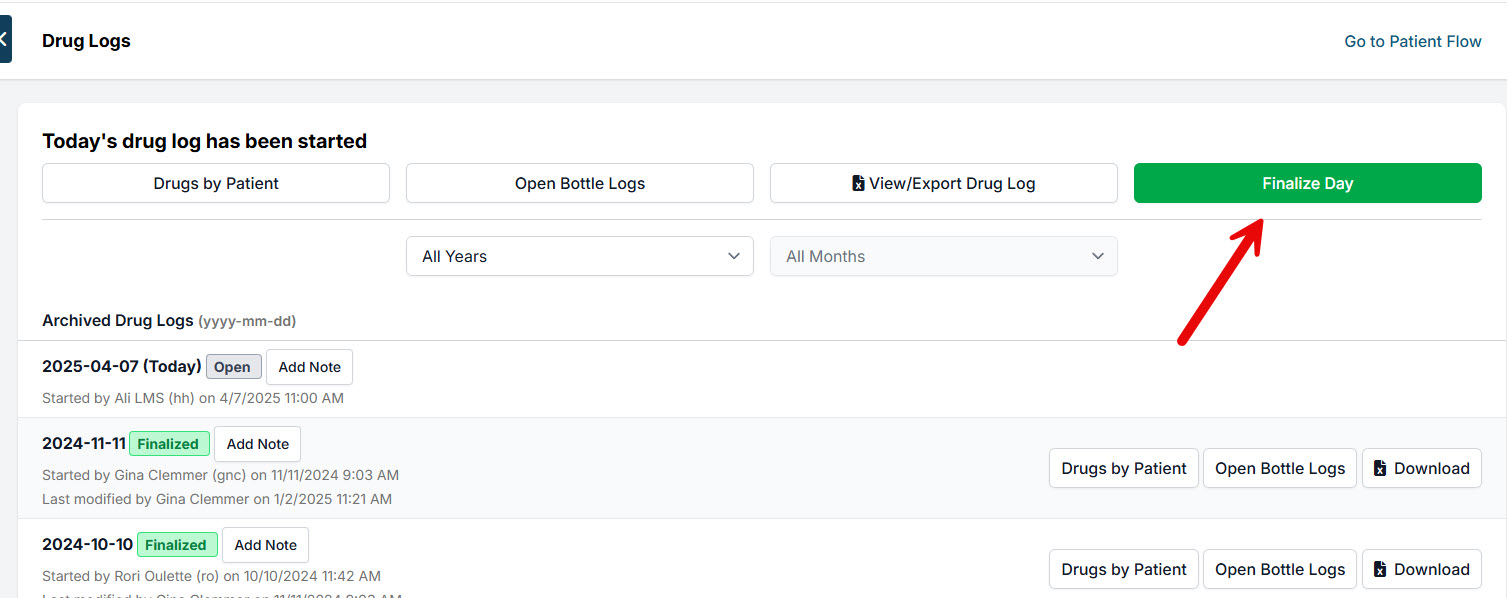
If the log was not finalized the previous day, you will not be able to start a new drug log.
To finalize the previous day's log:
- Click the Finalize Day button.
- Click Yes on the pop-up confirmation.
- The day is now finalized.
Closing the Drug Log
Once all of the animals get through Patient Flow, you will need to close out the drug log for the day.
- Go to Clients > Drug Log.
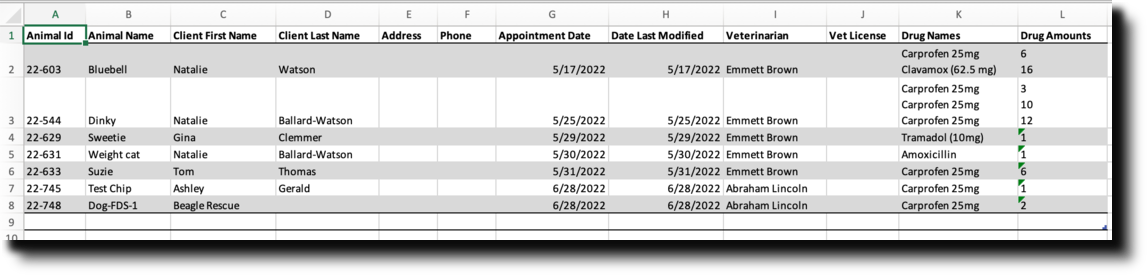
- Review the log before finalizing. Click View/Export Drug Log.
- From the spreadsheet, print the pages, have the veterinarian sign or initial, hole punch, and store in a binder.
- If the logs are correct and no changes or additions need to be recorded, click Finalize Day.
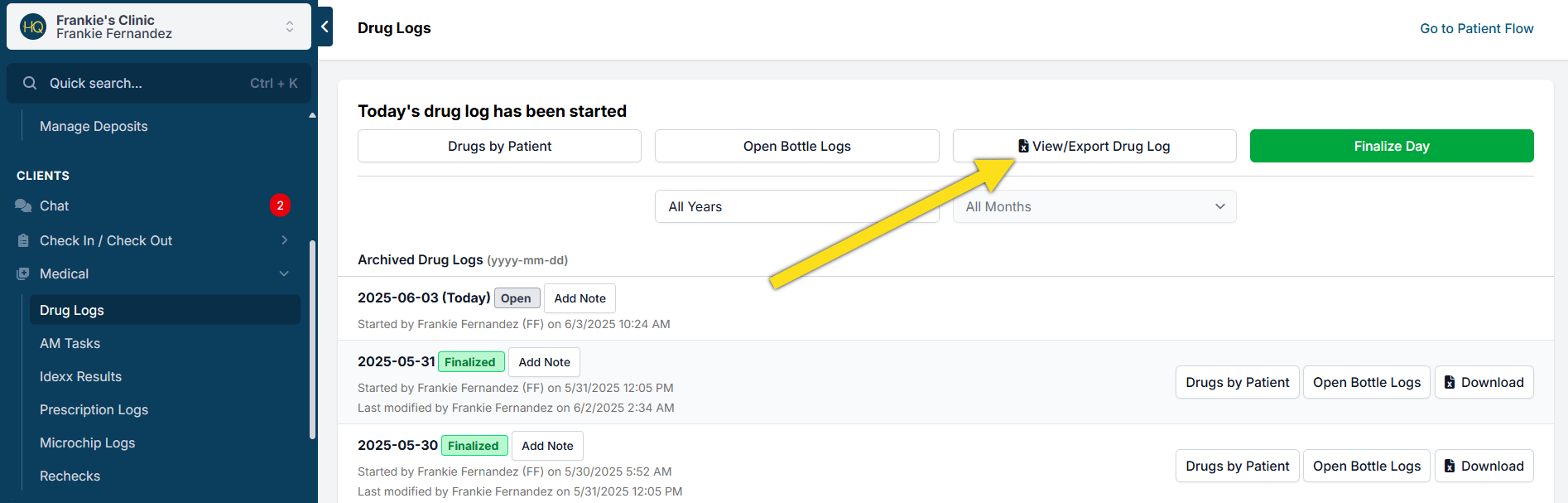
The log can be reopened up until midnight should more drugs need to be logged that same day. After midnight, the log cannot be reopened.
Editing the Drug Log
You will have until midnight on the same day to adjust the drug log. If a mistake is caught after the drug log is locked, you can only append a note to the log.
Drug Log was Finalized — How to Make a Correction or Add More Drugs
Same day: If the log was finalized and it is still the same day, go to Clients > Drug Logs and click Reopen the log. From Patient Flow, you can mark an animal as "Not Done" from the Treatment sheet/Surgery screen and make changes or add to their drug list. Once midnight hits, the finalized drug log cannot be reopened.
Next day: If the drug log was finalized and we are now into a new day or days later, there is no way to change that finalized log.
- First, when starting the new drug log for the next working day the starting balance of a drug bottle may be incorrect. From the startup pop-up screen, adjust the bottle's balance that had been logged incorrectly on the previous day.
- Next, edit the animal's appointment and make notes of what drug was not logged correctly under the Internal Medical Notes. Go to Check In/Checkout for that date, click the status ("Checked Out"), and use the Internal Medical Notes field on the Treatment sheet tab.
- Last, locate the drug log date in the log list and use the Add Note button to document what drug was logged incorrectly or not logged at all.
Appending a Note to the Drug Log
- Go to Clients > Medical > Drug Logs
- Click Add Note and add your note.
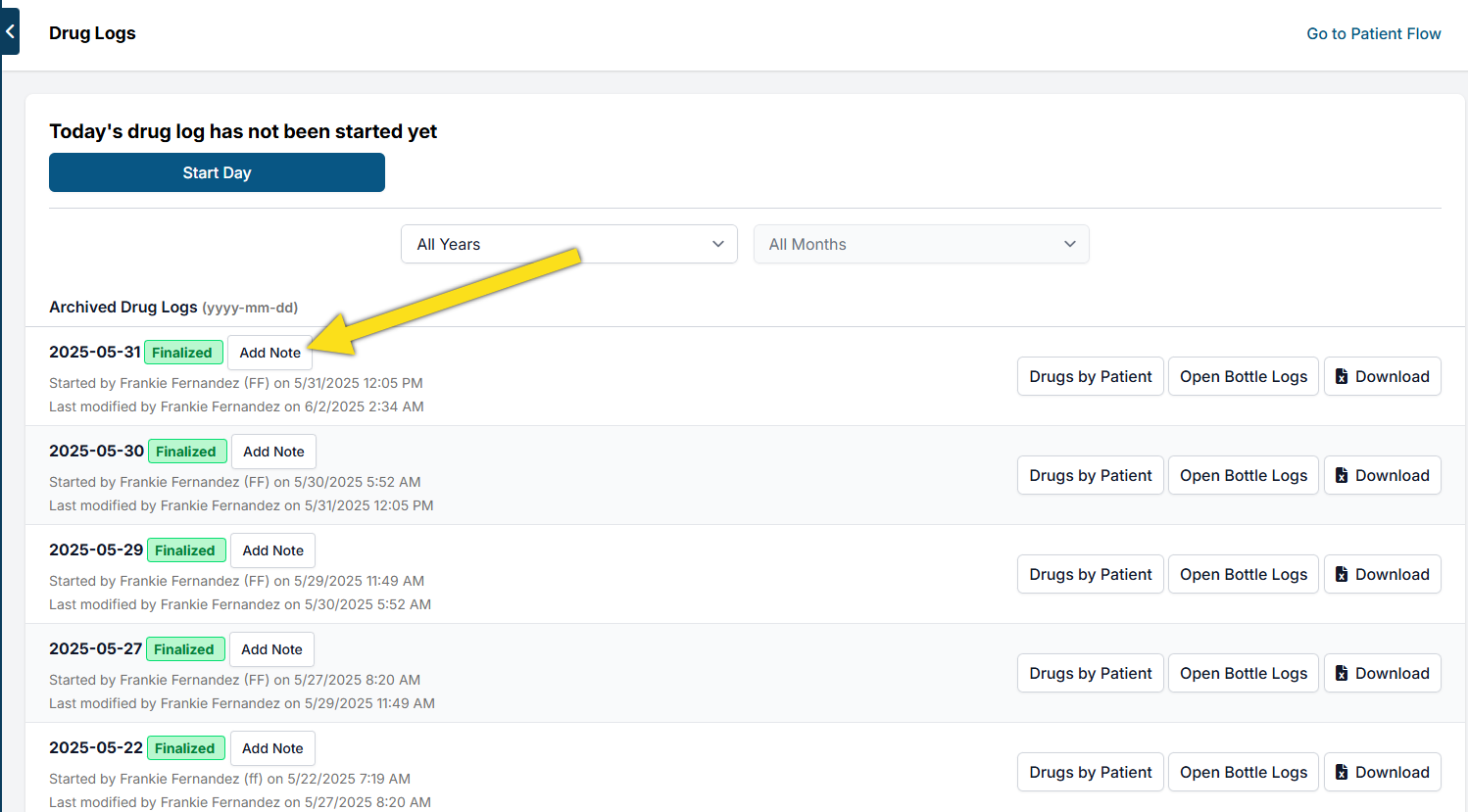
One way clinics use drug log notes is by having technicians enter their initials and a note such as "verified bottle balances" at the end of the day. This acts as a checkpoint so if the morning bottle balances are off, staff can look back at the note.
Uncommon Issues

Reopen a Done Bottle
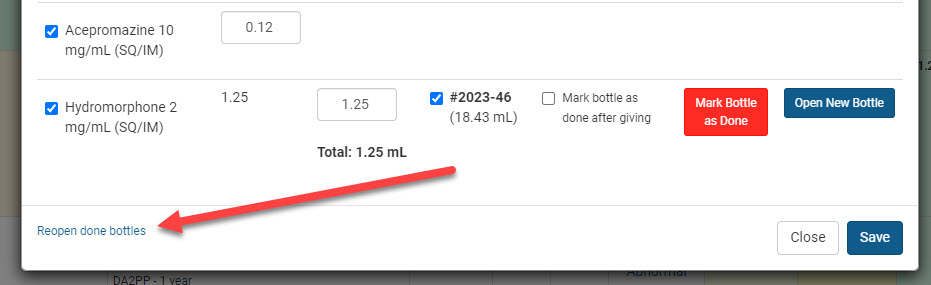
To reopen a CS bottle that was marked as "done" too soon:
- Click the Drugs button and choose to mark as Given (Exam) or Drawn (Drug Draw).
- From the pop-up, locate "Reopen Done Bottles" in the bottom left corner.
- Select the bottle to reopen and click the blue Reopen button.
Drawing from More Than One Bottle
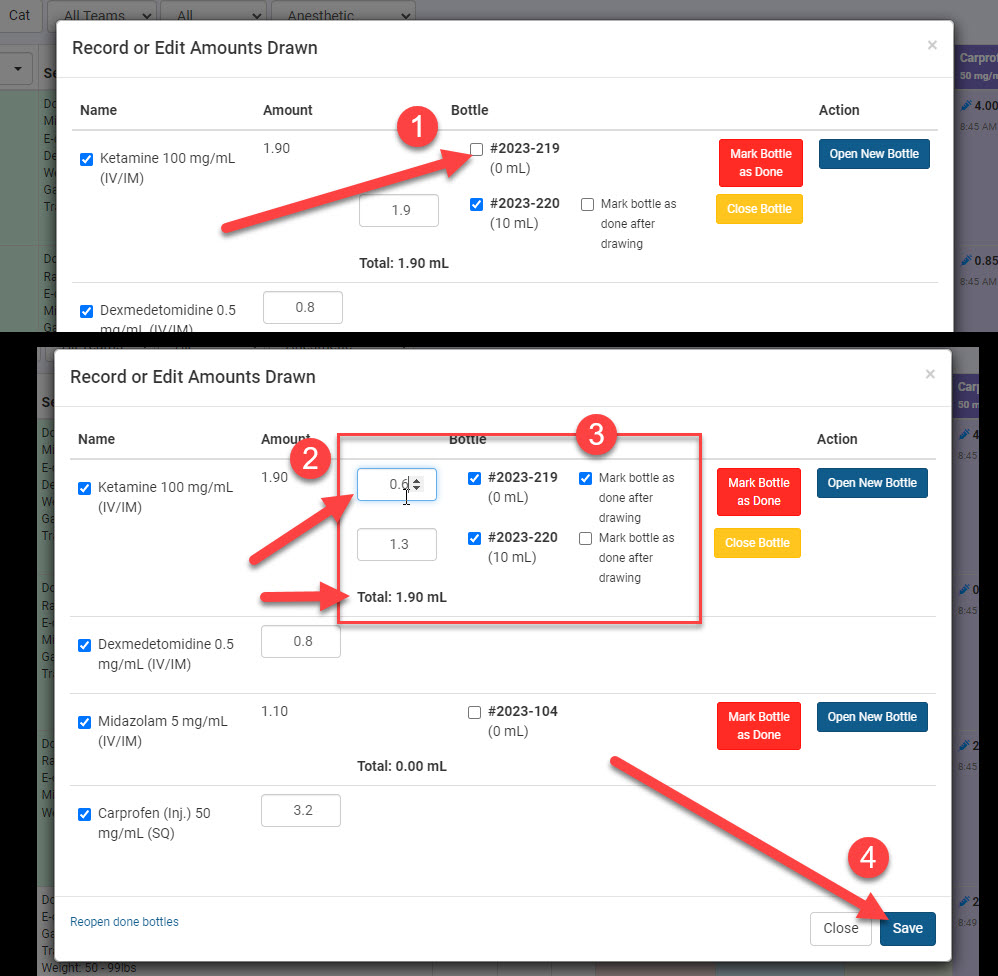
When you reach the end of a bottle and need to draw more drugs for the patient:
- Click the blue "Open New Bottle" button. This will create two open bottles on the draw screen.
- Select both bottles by ticking the box next to each bottle number.
- Type in how much was drawn from each bottle.
- Tick the box to "Mark bottle as done after drawing" if applicable.
- Confirm the total drawn and Save.
Drug Draw Correction
If all of the drugs were drawn but one dose is incorrect:
- Click the Drugs button again.
- Choose Edit Drugs.
- Use the revert button beside each drug to undo all drawn drugs, then click Done.
- Click Drugs > Drawn and redraw each drug, adjusting the dose for the one that was incorrect.
Surgery Postponed
If surgery is postponed until tomorrow: Use the Hold Overnight tool. See Patient Flow for steps.
If the return date is unknown:
- Scenario 1 (drugs will be wasted): Click Drugs > Waste Drawn, confirm all drugs listed have not been used, and click Done.
- Scenario 2 (drugs will be repurposed): Click Drugs > Edit Drugs, use the revert button beside each drug to return the drawn amount back to the bottle logs, then redraw on the correct animal.
Wasting a Partial Dose
If drugs were drawn but only part of the dose was given:
- Click the Drugs button.
- Choose Edit Drugs.
- Edit the amount to reflect what was given.
- Click Drugs > Waste and indicate the amount wasted and from which bottle. Initial and click Save.
Drug Log Printing
Using a Macro
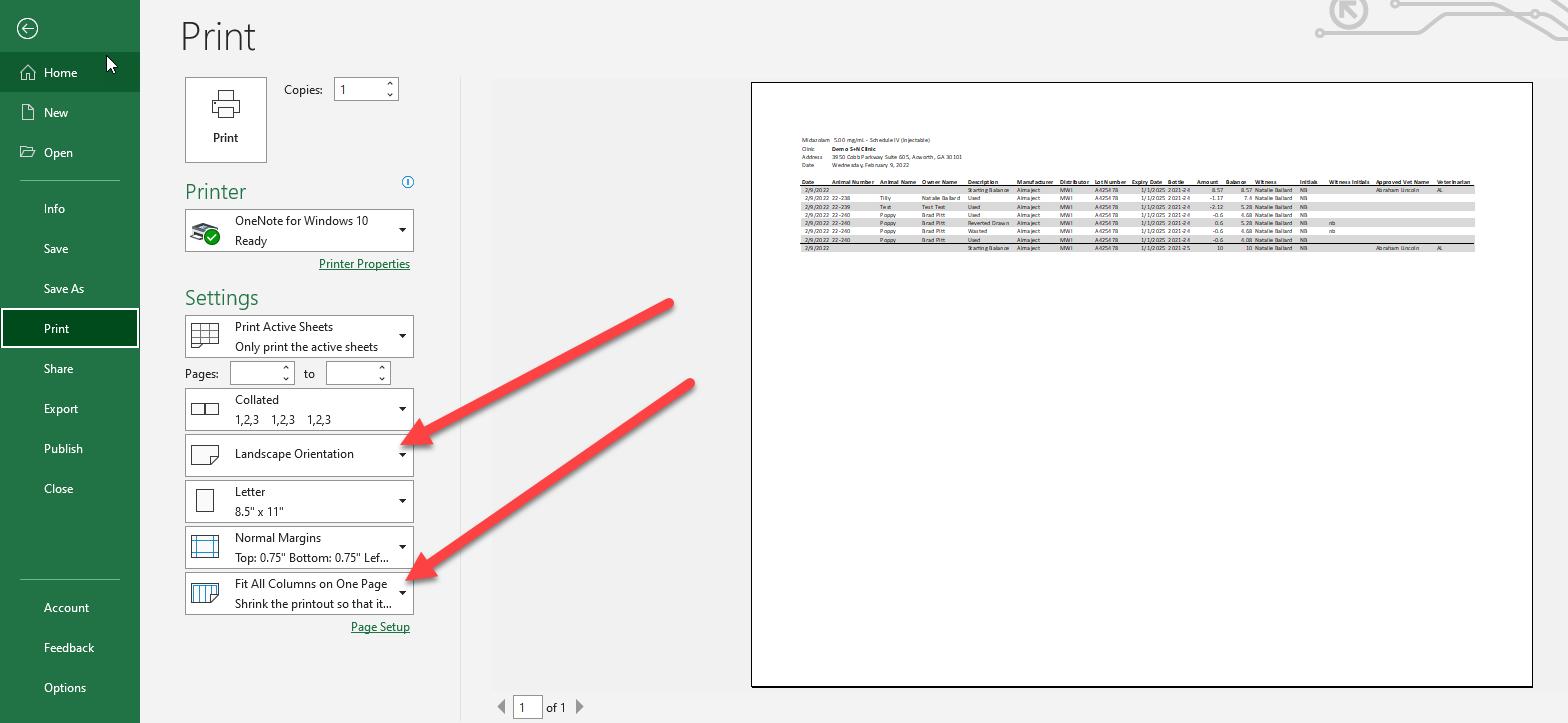
At the end of each day, clinics export the Drug Log to Excel and print it so that the vet can sign it. The pages get hole punched and stored in a binder. For large logs, a macro can automatically change column size, font size, margin size, and more with one click.
- Create Your Own Macro: Watch this YouTube video
Alternative to a Macro
Each time you print:
- Right-click on columns you do not need and choose Hide.
- On the print setup screen, change the page orientation to Landscape and set Fit All Columns to One Page.

Drug Log Report
First, it is important to know that if your clinic uses Patient Flow, your official Drug Logs are on the Client tab. The logs here are for the "old drugs tab" and/or medication dispensed as a prescription. This is an important record to have, and this tool helps you keep track and organize easily.
There are multiple filters at the top of this report page. Here you can filter for time period/date, drug type (surgical or prescription), and location. In the dropdown menus up top, you can also organize the report. The options include:
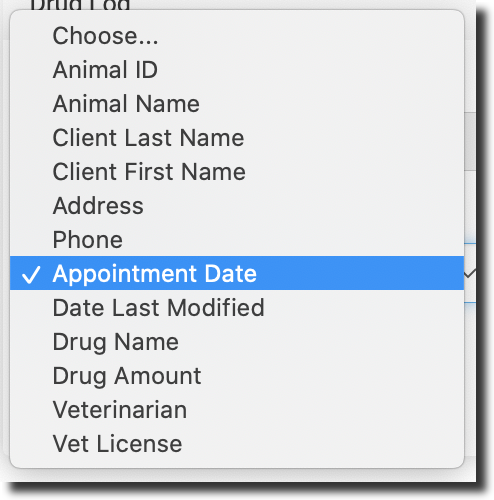
This report shows key details for each appointment, including:
- Animal information
- Client information
- Veterinarian information
The most important part of the report is the list of drugs given during the appointment. It shows each drug and the amount administered to the animal. The report is organized by appointment date and lists all drugs given during that visit. Below are all of the categories: