Suggested Rooms
In HQ, a Wellness Room is a scheduling lane on the Wellness Calendar. It can represent a physical room, a staff resource, or a block of the veterinarian's time.
For a one-veterinarian clinic open from 9:00 AM to 4:00 PM, start with the following three rooms. This keeps the calendar simple while separating procedures, veterinarian appointments, and technician services.
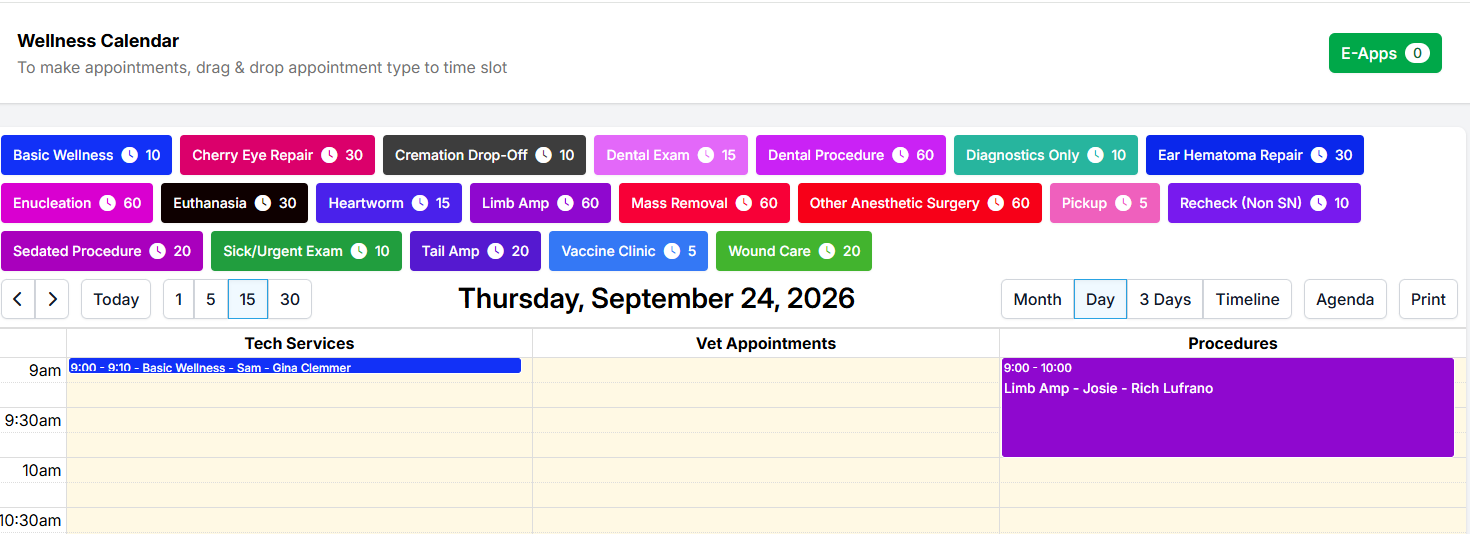
Example Wellness Calendar using the recommended three-room setup.
Recommended Three-Room Setup
1. Procedures
Suggested hours: 9:00 AM–12:00 PM
Allow these appointment types:
- Dental Procedure
- Mass Removal
- Cherry Eye Repair
- Ear Hematoma Repair
- Enucleation
- Limb Amputation
- Tail Amputation
- Other Anesthetic Surgery (non-SN)
This reserves the morning for anesthetic work without routine appointments competing for the veterinarian's time.
2. Vet Appointments
Suggested hours: 12:00 PM–4:00 PM on procedure days; 9:00 AM–4:00 PM on non-procedure days
Allow these appointment types:
- Basic Wellness
- Sick / Urgent Exam
- Recheck (non-SN)
- Heartworm
- Dental Exam
- Wound Care
- Sedated Procedure
- Euthanasia
Although Sedated Procedure is classified as Non-Anesthetic in Patient Flow, it belongs in this room because it still requires veterinarian time.
On days when the clinic is not performing anesthetic procedures, the Vet Appointments room can remain open for the full day.
3. Tech Services
Suggested hours: 9:00 AM–4:00 PM
Allow these appointment types:
- Vaccine Clinic
- Diagnostics Only
- Pickup
- Cremation Drop-Off
- Basic Wellness, if state law and clinic policy allow it without the veterinarian present
This room can remain open while the veterinarian performs procedures or exams. Adjust its capacity to match the number of technicians available rather than the number of physical exam rooms.
4. Comfort Room (Optional)
Add this only when the clinic's staffing, physical space, or event schedule makes a separate lane useful.
Use for:
- Euthanasia
- Cremation Drop-Off
This room can represent a quiet physical space reserved for end-of-life visits. Because Euthanasia requires the veterinarian, its available times must not overlap with other vet-dependent appointments.
Scheduling the One-Vet Day
A simple procedure-day schedule might look like this:
| Time | Procedures | Vet Appointments | Tech Services |
|---|---|---|---|
| 9:00 AM–12:00 PM | Open | Closed | Open |
| 12:00 PM–4:00 PM | Closed | Open | Open |
On a non-procedure day, keep Vet Appointments and Tech Services open from 9:00 AM to 4:00 PM and leave Procedures closed.
When entering room hours in HQ, the End Time is when the final appointment ends. For example, a 15-minute appointment beginning at 3:45 PM requires the room's End Time to be set to 4:00 PM.
Continue to Create Wellness Calendar Rooms for the steps to create Rooms and restrict which appointment types each Room accepts.
Multiple Vet Day
When more than one veterinarian is working, vet-dependent rooms can run at the same time. Keep the room names generic so the same calendar setup works whether the clinic has two, three, or five veterinarians:
- Procedures
- Vet Appointments 1
- Vet Appointments 2
- Add Vet Appointments 3, Vet Appointments 4, and so on only when those lanes will be staffed.
- Tech Services
For example, a two-veterinarian procedure day might look like this:
| Time | Procedures | Vet Appointments 1 | Vet Appointments 2 | Tech Services |
|---|---|---|---|---|
| 9:00 AM–12:00 PM | Open — Vet 1 | Open — Vet 2 | Closed | Open |
| 12:00 PM–4:00 PM | Closed | Open — Vet 1 | Open — Vet 2 | Open |
Both Vet Appointments rooms accept the same appointment types. When the morning procedures finish, the veterinarian covering Procedures moves to the second Vet Appointments lane, increasing afternoon capacity.
For three or more veterinarians, open one additional Vet Appointments lane for each veterinarian available for appointments. If the clinic has multiple fully staffed anesthesia teams, it may instead create Procedures 1, Procedures 2, and additional procedure lanes as capacity allows. Additional veterinarians alone are not enough; every procedure lane also needs appropriate technicians, equipment, induction space, and recovery capacity.
If a veterinarian is handling a Comfort Room visit, close the corresponding time in that veterinarian's regular appointment lane so the same person cannot be booked twice.
High-Volume Vaccine Clinics
Some clinics use the Wellness Calendar primarily for high-volume vaccine clinics rather than offering the full range of detailed Wellness appointments. In that case, keep the room setup simple and create two parallel rooms:
- Lane 1
- Lane 2
Set both rooms to run from 9:00 AM to 12:00 PM and restrict them to the Vaccine Clinic appointment type. Each lane represents one team moving pets through the same high-volume workflow.
Choosing the Appointment Duration
Budget 3 minutes per pet when setting the Vaccine Clinic appointment type's duration.
Use this formula to calculate the capacity of each lane:
Clinic minutes ÷ minutes per pet = available appointments per lane
For a clinic open from 9:00 AM to 12:00 PM:
- Three clinic hours × 60 minutes = 180 available minutes.
- 180 minutes ÷ 3 minutes per pet = 60 pets per lane.
- 60 pets in Lane 1 + 60 pets in Lane 2 = 120 pets across both lanes.
| Room | Start | End | Appointment Type | Duration | Capacity |
|---|---|---|---|---|---|
| Lane 1 | 9:00 AM | 12:00 PM | Vaccine Clinic | 3 minutes | 60 pets |
| Lane 2 | 9:00 AM | 12:00 PM | Vaccine Clinic | 3 minutes | 60 pets |
| Total | 120 pets |
See the complete Vaccine Clinics guide for online scheduling, staffing, preparation, clinic-day flow, and checkout recommendations.
Suggested Wellness Types
A practical starter list of Wellness appointment types, booking lengths, Patient Flow classifications, and matching aftercare documents.
Setting Up Wellness
Configure Wellness appointment types, detailed service items, rooms, consent forms, aftercare documents, online booking, and Patient Flow.