Special Scheduling Situations
Walk-Ins
A walk-in appointment is when a client arrives at your clinic without a scheduled time, requesting care for their animal.
Even though walk-ins cannot be scheduled in advance, it is still important to create an appointment in HQ. This ensures a medical record is created and allows the visit to move smoothly through Patient Flow.
Scheduling a Walk-In
- Open Quick Search (Ctrl + K).
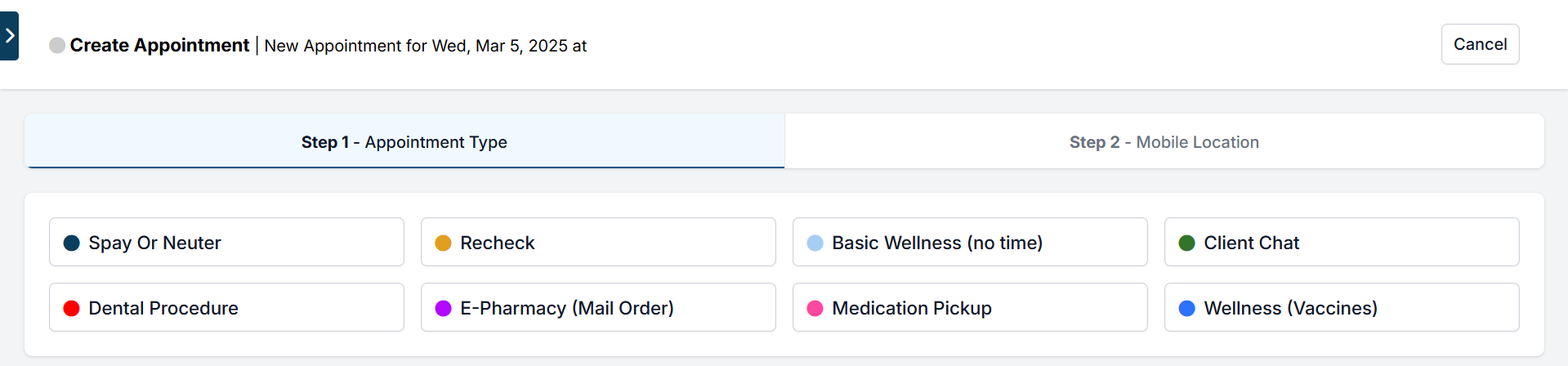
- Select Walk-In Appointment.
- Choose the purpose of the appointment.
- Enter the client and patient details.
- Save to create the appointment.
Walk-ins can be scheduled as any appointment type and will follow the same check-in and check-out process as regular appointments.
Why Create an Appointment for Walk-Ins?
Documenting walk-ins in HQ ensures:
- Client and patient information is captured.
- The visit moves through Patient Flow.
- Proper check-in and check-out steps are followed.
- Accurate take-home paperwork is generated.
- A complete medical record is created.
Already Sterilized Status
Many clinics need to track whether an animal is already sterilized. This is especially useful when making wellness appointments for animals that will be treated repeatedly.
In HQ, you can:
- Mark an animal as already sterilized internally.
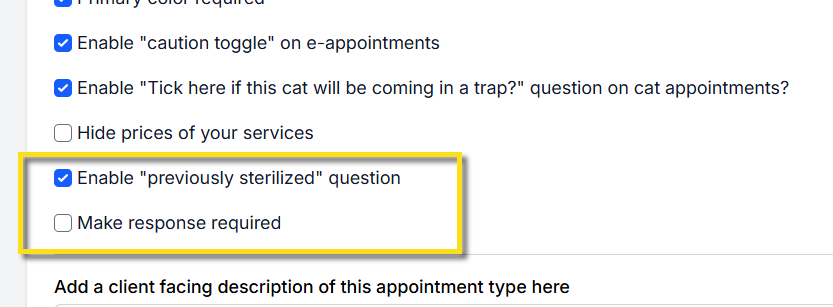
- Make this question available (optional or required) for clients booking online.
Marking an Animal as Already Sterilized
Internally — When creating a Wellness appointment, on the Animal Information step you'll see a field to mark whether the animal is already sterilized. Once selected, this status will carry over to the animal's subsequent appointments.
Externally (Online) — To enable this question for online wellness appointments:
- Go to Settings > E-Appointments.
- Select the Wellness appointment type (note: this does not apply to spay/neuter appointments).
- Check Enable "previously sterilized" question.
- Optionally, check Make response required.
See Set Up Wellness Appointments Online for the rest of the online Wellness configuration.
Automatic Status Updates
If an animal has been spayed/neutered through HQ, the system will automatically recognize them as sterilized. You do not need to manually update their status.
Troubleshooting — If a previously sterilized pet does not display the correct status:
- Locate the original spay/neuter appointment.
- Open the treatment sheet and confirm:
- Surgical Candidate = Yes.
- Plan: Surgically Sterilize = Accept.
- Click Done to update the exam.
- Complete Checkout again to push the update through the system.
Merge Field for Templates
The AlreadySpayedNeutered merge field can be used in custom templates.
- By default, this field is included in the HQ Treatment Sheet and Medical Record.
- If you are customizing documents, add the merge field where needed.
- See the Merge Field Document for reference.
Where to Update Sterilization Status
- Appointment/Checkout Page: In the Treatment Sheet tab, use the "Sterilization Status" box and click Update.
- Patient Flow: On the Treatment tab, the Sterilization Status box appears on the right-hand side.
- Online Appointment Queue: While approving appointments, click the blue Edit button to update the sterilization status as needed.
Feral Cats

Scheduling spay/neuter appointments for feral cats is a critical part of managing community cat populations. This section explains how to schedule ferals using the E-Appointments (E-Apps) system, along with pricing recommendations.
How to Schedule Feral Cats on E-Apps
- Go to Settings > E-Appointments > Edit Spay/Neuter appointment type.
- Under General Preferences, check Allow clients to mark if a cat will be arriving in a trap.
How it works:
- By default, the animal type for all e-appointments is Owned.
- If a client selects the trap checkbox, the system automatically switches the animal type to Community Cat Feral.
- If your Capacity Management settings assign different animal types to separate calendar tiles, the appointment will be moved from the Owned tile to the Community Cat Feral tile.
✅ Pro Tip: If the animal's sex is unknown, enter female. Female surgeries typically take the most time, ensuring the schedule allows enough capacity. You can adjust later if needed.
❌ Important: Do not use "lion" or other species labels to differentiate ferals. This causes incorrect consent forms and creates confusion for staff and clients.
Pricing Adjustments for Feral Cats
In Clinic HQ, all cats must use the same surgery line items: Cat Spay and Cat Neuter. Custom items such as Feral Cat Spay or Feral Cat Neuter cannot be created.
Options for adjusting pricing:
- Create Packages: Set up bundled packages specifically for feral cat surgeries (e.g., surgery + vaccine at a discounted rate).
- Set Up Subsidies: Apply subsidies in two ways:
- Using a grant: Apply discounts based on external funding for feral surgeries.
- Billing for discounted portions: Charge clients only for the subsidized portion. See Subsidies for setup guidance
Address Requirements & Special Circumstances
Addresses are often the most time-consuming data field to enter — sometimes taking twice as long as other client information. Asking for the address at the time of appointment booking helps spread out the workload and prevents delays during checkout.
Address Requirements for Medical Records
Many municipalities require a physical address for medical records and rabies certificates. This ensures accurate documentation and proper tracking for public health and safety.
When an animal is microchipped, it should be registered under a physical address (not a PO Box). This improves the chances of reuniting the animal with its owner if the pet is lost.
Special Circumstances
- Native American Reservations: In some cases, only a PO Box may be available. This is acceptable when no physical address exists.
- Houseless Clients: If a client does not have a permanent address, use the last known long-term address. This approach aligns with federal standards and helps keep client records consistent and up to date.
Secondary Owners
Sometimes multiple people share responsibility for the same pet. To maintain accurate medical records, each patient in HQ must have one primary owner assigned to their account.
How to Record a Secondary Owner
- Record the primary owner as usual.
- Add the secondary owner's name in the animal's notes section for reference.
- You may also include details in appointment notes (e.g., "Husband Dave is picking up").
Important Notes
- Veterinary records are legal documents and must remain tied to a single primary owner.
- Secondary owner information is for reference only and is not searchable within HQ.
- This approach ensures records stay legally accurate while still allowing staff to note shared responsibilities.
Medication Pickups & Refills
Medication pickups and refills should be scheduled in HQ to help your clinic track when medications need to be prepared and when clients are expected to arrive.
Scheduling Medication Appointments
If related to a recent spay/neuter appointment:
- Schedule a Recheck appointment.
- Add the medication under the Services section of the new appointment.
If unrelated to spay/neuter:
- Create a Medication Pickup/Refill appointment on the Wellness Calendar.
- Add medication pickup details to the appointment confirmation.
- Ask the client for an estimated pickup time so the appointment can be added in HQ.
This ensures staff know when to fill the medication and when to expect the client.
Setup
To create a dedicated Medication Pickup/Refill appointment type, see Create Wellness Appointment Types.