Scheduling Rules & Appointment Types
Who to Schedule Under
The cardinal rule in HQ is that appointments should always be made under the person or organization physically bringing the animal through the door.
If billing needs to be directed elsewhere, HQ provides tools to handle subsidies. For example:
- If Jane Smith has a voucher and the SPCA is paying, the appointment should still be under Jane Smith, with the subsidy tool used to bill the SPCA.
Examples
- Individual Owner – Jane Smith brings in her cat → Appointment is made under Jane Smith. She is both the client and owner.
- Organization – The Raleigh SPCA brings in 10 animals → Appointments are made under the client, Raleigh SPCA, even if some of the animals have individual owners.
- Foster on Behalf of an Organization – Foster Betty Jones brings in a puppy for the SPCA → Appointment is made under the client, Raleigh SPCA. Betty can be associated as a volume client owner.
- Voucher/Third-Party Payment – Jamie Connelly brings in her kitten with a shelter voucher → Appointment is made under owner Jamie Connelly, with billing redirected to the SPCA via subsidy.
- TNR Trapper – Shirley Walker brings in 6 cats and plans to bring 3 more later →
- Option A: Keep as public appointments for now.
- Option B (more efficient): Create a volume client profile (e.g., "Shirley Walker TNR") and merge her public appointments into it.
VIDEO ON THIS TOPIC
Internal vs. External Appointments
Clinic HQ supports two main appointment methods: internal (staff-booked) and external (client-booked online).
Internal Appointments
- Definition: Scheduled by staff directly within Clinic HQ.
- Who uses them:
- Volume clients (can only be scheduled internally).
- Public clients (can be scheduled either internally or externally).
- When to use:
- For clients who are elderly, unfamiliar with technology, or lack computer access.
- For special cases where staff intervention is necessary.
External Appointments
- Definition: Appointments clients make themselves online through your scheduling link.
- Who uses them: Public clients only.
- How it works:
- The scheduling engine only shows available slots, ensuring no overbooking.
- Once requested, the appointment is instantly reserved on your calendar, even before you "confirm" it.
Best Practices
Default strategy: Encourage clients to schedule online whenever possible.
Why:
- Reduces staff workload.
- Proven effective across diverse communities.
- Case studies:
- Hopi Reservation: 100 dog appointments, only 5 required follow-up calls.
- Laguna Reservation: 95% of clients preferred online scheduling (via link, QR code, or phone number).
- Myth busted: Most clients are capable and willing to schedule online.
Volunteers and Appointment-Making
- Access control: Do not give volunteers full access to Clinic HQ.
- Alternative method: Volunteers assisting clients can use the E-Appointment form (available on your website) instead. This allows them to help without needing HQ access.
Appointment Types: SN, Wellness & Rechecks
The scheduling system allows clinics to book appointments based on sex, species, and weight of the animal. The system calculates how many spots are available and can also check mobile location availability.
Key Rule:
- Public clients may schedule appointments online.
- Volume clients must be scheduled internally, but they can enter animal details through the Volume Client Portal.
Spay/Neuter (SN) Appointments
- Primary purpose: Spay/neuter surgery.
- Additional services: Vaccinations, microchips, dentals (if paired with spay/neuter).
- Scheduling style:
- Usually not tied to individual times.
- Bulk check-in windows (e.g., 7:30–8:30 AM).
- Focus on balancing species (dogs/cats) and sex (male/female).
- Capacity depends on: Number of kennels and number of veterinarians.
- Mobile clinics: May schedule by timeslot to prevent overcrowding.
Wellness Appointments
- Definition: Any non-spay/neuter appointment.
- Examples:
- Vaccine clinics (most common)
- Exams
- Medication pickups
- Dentals
- Mass removals
- End-of-life services
Read What is Wellness? for the complete distinction between Wellness, spay/neuter, and recheck appointments.
✅ Best practice: Pre-schedule wellness appointments. Walk-ins are allowed, but scheduled vaccine clinics run much faster. See Booking Wellness Appointments for online and staff-booked workflows.
Recheck Appointments
- Definition: Follow-up exams only for spay/neuter surgeries.
- When to use: For incision checks after SN.
- When not to use: If the recheck is for another procedure (e.g., dental follow-up), schedule it as a wellness appointment instead. Over 10,000 items are available to label appointment services correctly (e.g., Dental Follow-Up).
- Restriction: Only book a recheck if the animal has had a spay/neuter.
At-a-Glance
- SN Appointment = Spay/neuter primary purpose, often bulk check-in.
- Wellness Appointment = Any other service, ideally pre-scheduled.
- Recheck Appointment = Only for post-SN incision checks.
Anesthetic vs. Non-Anesthetic
Appointments can be classified as Anesthetic or Non-Anesthetic. Correct classification ensures smoother navigation in Patient Flow and proper categorization of services.
Definitions
- Anesthetic: Any appointment where the animal receives medication to block pain. Not limited to full surgical anesthesia — includes dentals or mass removals where drugs are required.
- Non-Anesthetic: Appointments where no drugs are used for pain management. Common examples: vaccine clinics, wellness exams, medication pickups.
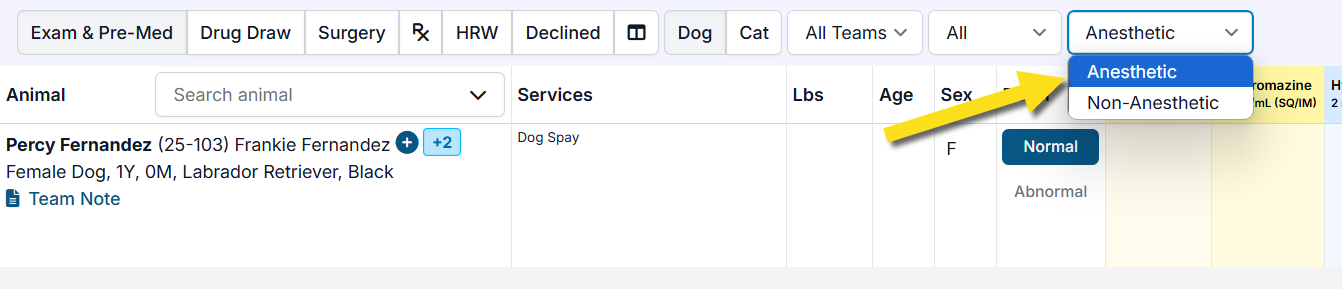
✅ Pro Tip: Correctly categorizing allows you to filter Patient Flow by anesthetic vs. non-anesthetic if desired.
Configuration
- SN appointments are always anesthetic by default.
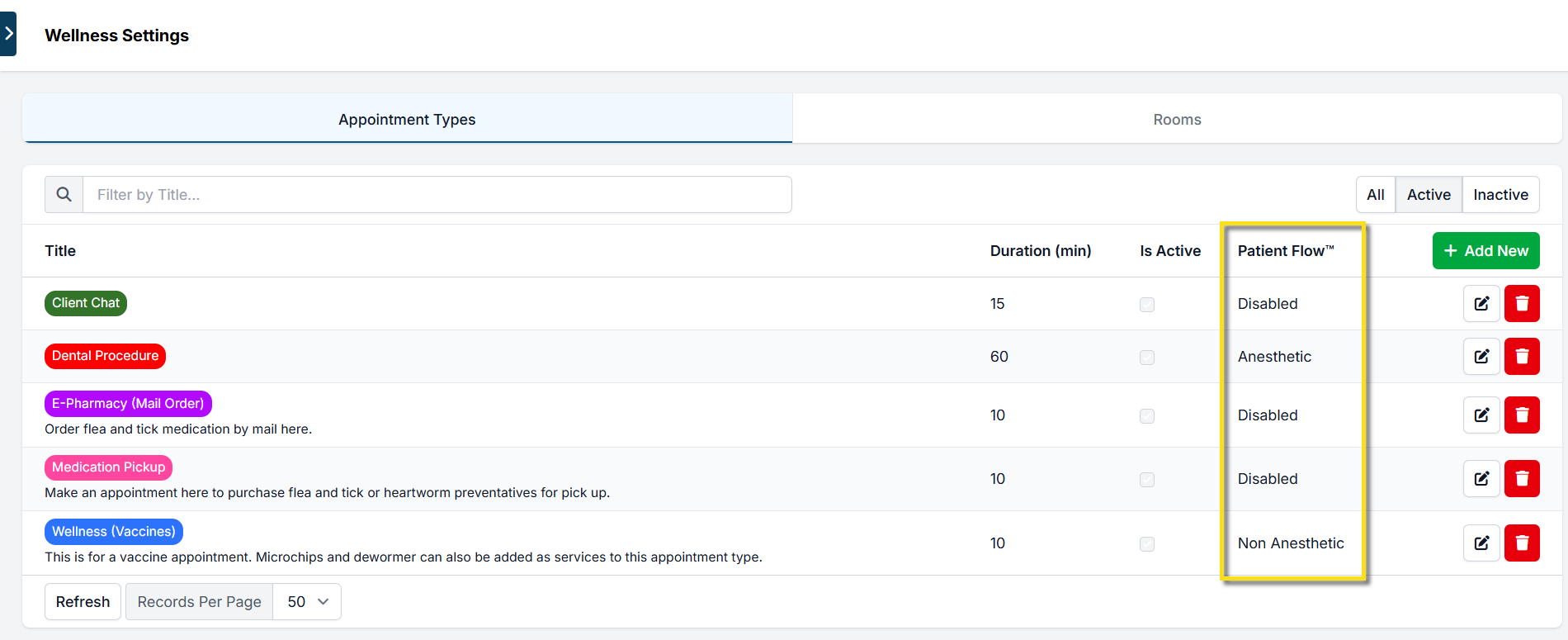
- Wellness appointments must be manually set as anesthetic, non-anesthetic, or disabled in Patient Flow.
To configure the classification and understand how each option changes the daily workflow, see Wellness Patient Flow.
To configure:
- Go to Settings > Wellness Settings
- Edit each appointment type individually.
Examples
- Dental Appointment → Anesthetic (requires anesthesia).
- Vaccine Clinic → Non-Anesthetic (no anesthesia).
- E-Pharmacy Mail Order → Disabled in Patient Flow (not an in-clinic appointment).
Key Takeaway
- SN = always anesthetic.
- Wellness = must be classified individually in Settings.
- Correct setup ensures appointments display properly in Patient Flow with accurate treatment sheet and drug log reporting.