13. How to Discount Things (Subsidies)

Subsidy Overview.
A subsidy, also referred to as a discount, can be applied to line items on an appointment to change pricing, pull funds from a grant, or bill a third party.
What Is a Subsidy.
The words Subsidy and Discount are often used interchangeably.
A subsidy is how you apply money from a funding partnership to an appointment. A subsidy may originate from an in-house discount, a voucher issued by an outside organization, or a grant awarded to your clinic.
How Subsidies Work.
Read how to create a subsidy in the Settings section of the manual:
Subsidy Settings
After a subsidy has been created, it can be applied to services and products on an appointment using the Discount button. This can be done when scheduling an appointment internally, when approving an online request, or on the day of the appointment.
When applied to a line item, the subsidy adjusts the price based on the Client Discount amount.
If the subsidy is linked to an invoiced partnership, the cost of the line item is transferred to the associated volume client.
That volume client can be invoiced once the appointment is checked out.
If the subsidy is linked to a pre-paid partnership, the preset amount is pulled from the grant or donation balance.
The funds remain in a pending state until the appointment is checked out.
Reports can be generated to track available funds from pre-paid grants.
For current balances that account for pending subsidies, review the Subsidies Summary Report
Using a Subsidy Discount.
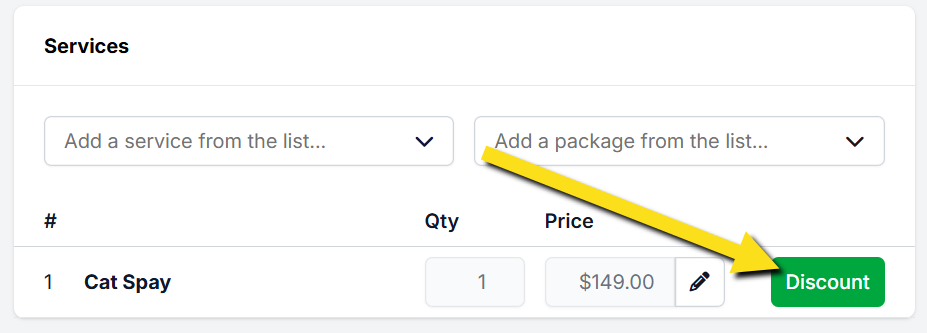
- View the services listed on an animal’s appointment.
- Locate the green Discount button next to the appropriate service line item.
- Click the Discount button to begin applying a subsidy.
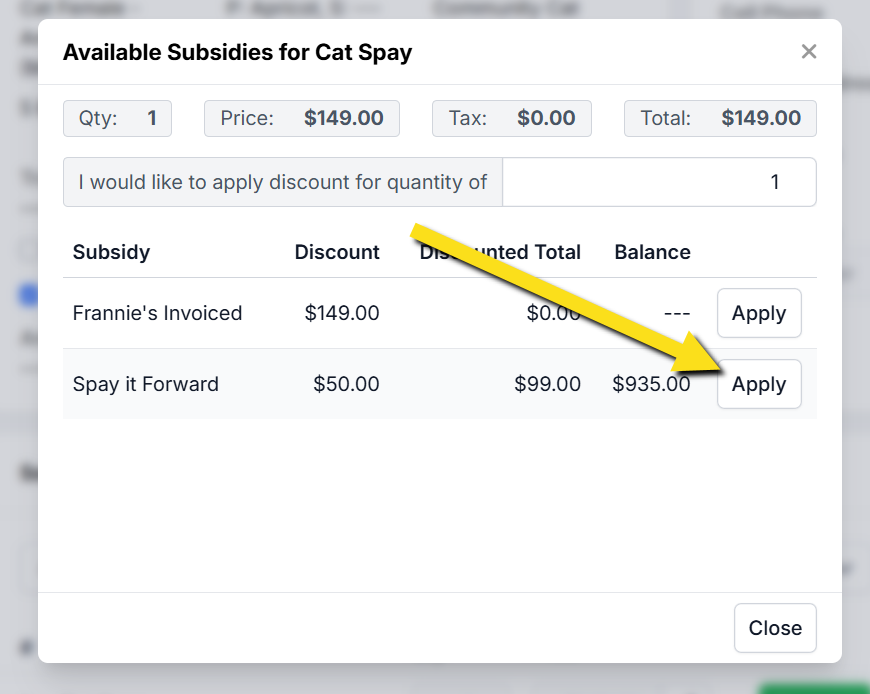
#_ Review the list of available subsidies.
- Select the appropriate subsidy.
- Click Apply to update the service price.
Each service line item may have its own subsidy applied.
Different subsidies can be used across services within the same appointment, such as applying one grant to a spay or neuter and another subsidy to a vaccine.
❌ Caution: Only one subsidy may be applied per line item.
If your clinic needs to apply more than one subsidy to a single service, follow the instructions here: Using Two Subsidies on One Item