9.1. Consent Forms
9.1.1. Getting Clients to Pre-Sign Consent Forms
In Settings, you can upload your consent form templates. Forms can be created for spay/neuter, wellness, and recheck appointments.
In Settings, you can upload your consent form templates. Forms can be created for spay/neuter, wellness, and recheck appointments.
✅ Pro Tip: All wellness appointments (dentals, vaccines, etc.) use a single wellness consent form. This simplifies the process in some cases, but may also add complexity.
Public Clients
- When you create or approve an appointment, HQ automatically emails the consent form to the owner.
- You don’t need to take any extra steps—just make the appointment.
- Owners will receive reminder emails every two days until the form is signed.
Volume Clients
- Volume clients pre-sign consent forms through the Volume Client Portal (VCP).
- They can bulk-sign all consent forms at once:
- Once all animals are entered, go to Appointments.
- Completed forms appear with a tick box.
- Select the animals and click Bulk Sign to complete all forms.
- On the next page, clients can answer additional questions for each animal. They can also apply responses to all forms at once instead of filling them out individually.
Volume Client Owners (Your Clients’ Clients)
- Volume clients can also send consent forms directly to their own clients (pet owners).
- If the owner section is filled out, the consent form can be emailed to the pet’s owner:
- Click the three-dot icon for the animal.
- Select Send to Owner.
- The owner will then receive the consent form to sign before surgery.
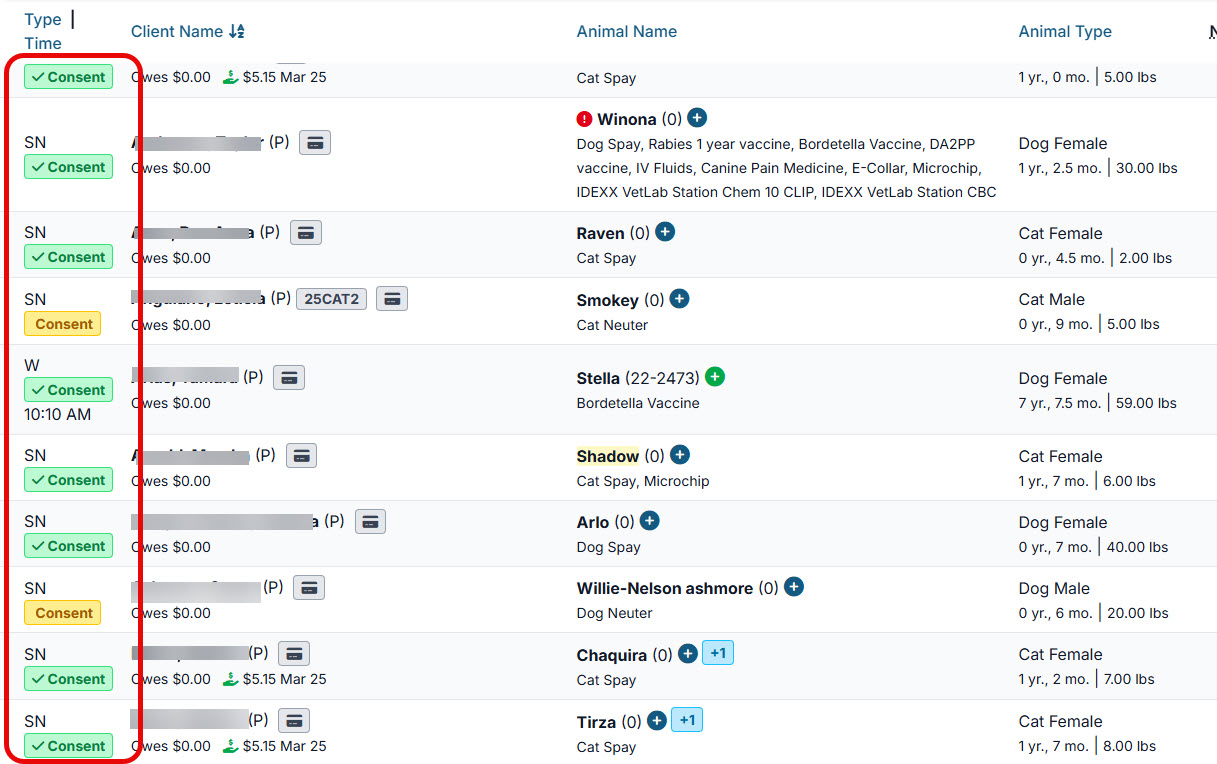
Tracking Signatures
- The system shows which forms are signed and which are pending: ** Green = signed ** Yellow = not yet signed
Storage
- Signed consent forms are automatically uploaded to the patient’s record under Documents.
- A copy is also emailed to the client after signing.