9.1. Consent Forms
9.1.2. Signing Consent Forms Day-Of
When Pre-Signing Isn’t Possible
While pre-signing consent forms is always preferable, it may not always happen. That’s okay—clients can sign directly on a tablet using their finger through E-Lobby.
Signing Consents Curbside
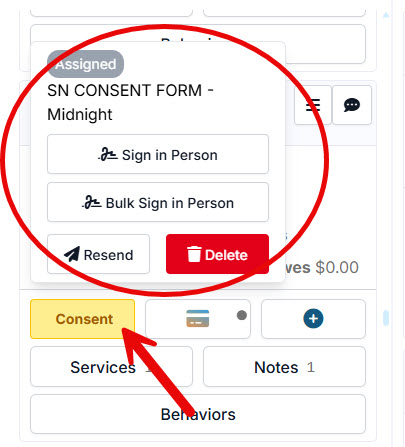
E-Lobby makes it simple to collect signatures in person. Clients can sign for a single pet or bulk sign for multiple pets at once.
To sign consent forms in E-Lobby:
- Click the yellow Consent button on the patient’s card.
- Green Consent button = already signed.
#_ Select Sign in Person (for one pet) or Bulk Sign in Person (for multiple pets).
- The consent form will open for signing.
- To bulk sign, select the bulk option.
Common Questions
Do we need a signature pad?
No. The system is designed for finger signing on any tablet. We recommend Surface Go tablets, but any tablet will work.
What if I forget to have them sign?
In Settings, you can enable a requirement that prevents appointment check-in without a signed consent form. We highly recommend turning this feature on.