Templates
14.5. HQ's Vaccine Clinic Visit Summary Template
Visit Summary Template Overview.
Every appointment should receive an emailed or printed visit summary detailing the services rendered and any client communication notes.
HQ recommends using a custom template for visit summaries.
Download HQ Recommended Templates (follow link and open HQ Templates.) AVAILABLE IN ENGLISH & SPANISH.
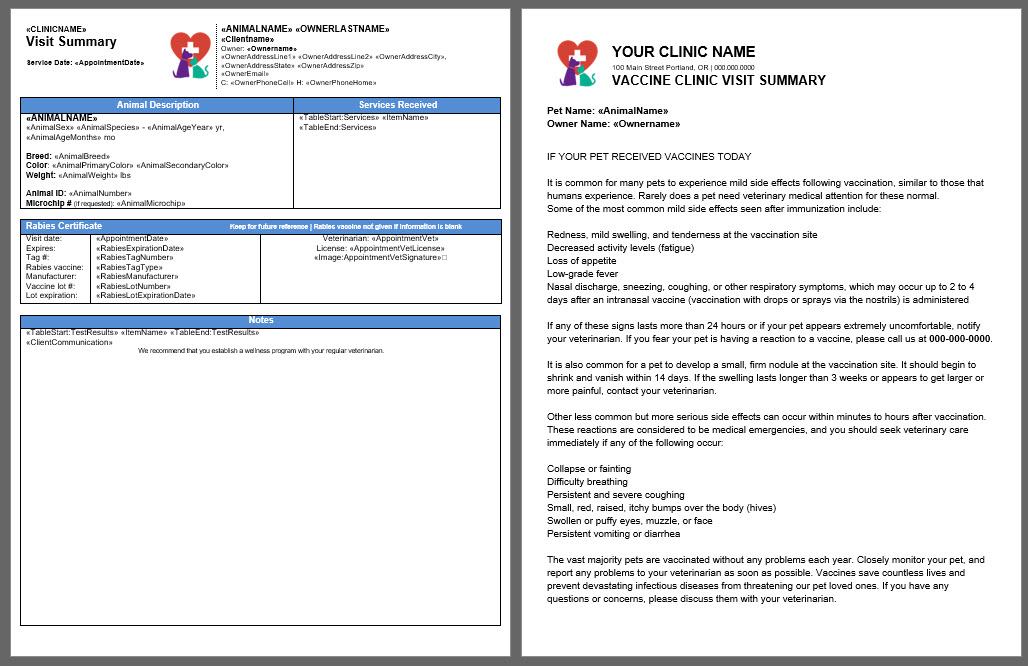
Take Home Template Structure.
A good take-home template acts as an all-in-one document and includes the following components.
- Animal and owner information, including the owner’s address and an animal description.
- Services received.
- Rabies certificate lot information, which only populates if a rabies vaccine was administered and the certificate generated.
- Notes about the visit.
- Client Communication, which uses a merge field to populate triggered notes based on exams, services, or other (blank)pre-written Medical Notes.
- Test results.
- Other merge fields based on clinic preference, including options such as exam notes and prescriptions.
- Aftercare instructions.
Aftercare instructions should include the following.
- Information about monitoring for vaccine reactions.
- Instructions for what the client should do if a concern arises.
You can use our default language or copy and paste your own instructions into the Visit Summary document.
Use Item Triggered Notes for Aftercare Instructions.
- The merge field called Client Communication produces pre-written notes from Medical Notes.
- Create Item Triggered Notes in Settings and then Medical Notes to provide aftercare instructions for additional services performed during the wellness visit.
- For example, if the animal received a dental cleaning, use the dental cleaning line item to include notes about sedation effects and feeding a small dinner instead of a full meal.
- This pre-written message only appears on the visit summary if the corresponding service is included on the appointment.
Assign the Template as a Take Home Template.
- Assign the discharge visit summary as a Take Home Template when uploading it to Settings > Templates.
- Assigning a template as Take Home Paperwork allows you to send it automatically using Patient Flow Automations.
- Public clients can request copies of this paperwork using the Medical Record Request link.
- Volume clients can access this paperwork through their portal based on settings HERE.