1.5.4. Training Clinic
At HQ, every user has access to their own personal training site. This dedicated space is designed to give you the freedom to explore without any worries. You can test out new features, enter sample data, and experiment with different workflows—without the risk of affecting your real clinic site.
Each training clinic comes *pre-loaded *with helpful templates, drug logs, and other resources to get you started quickly. However, you’re not limited to what’s provided—you can easily upload your own files, customize settings, and make it feel like your real clinic environment.
Think of this training clinic as your sandbox, a safe place where you can learn, practice, and build confidence in using HQ. Whether you’re brand new or looking to refine your skills, this is your playground to explore all that HQ has to offer.
Access Your Own Personal Training Clinic
To access your training clinic, navigate to the Help & Support menu, then click on Visit Training Site tile. This site allows staff to use Clinic HQ to its full capacity without any risk of making mistakes. Team members can safely practice tasks such as:
- Making appointments
- Drawing and wasting drugs
- Exploring different settings
- Testing out features and workflows
All of this can be done without liability.
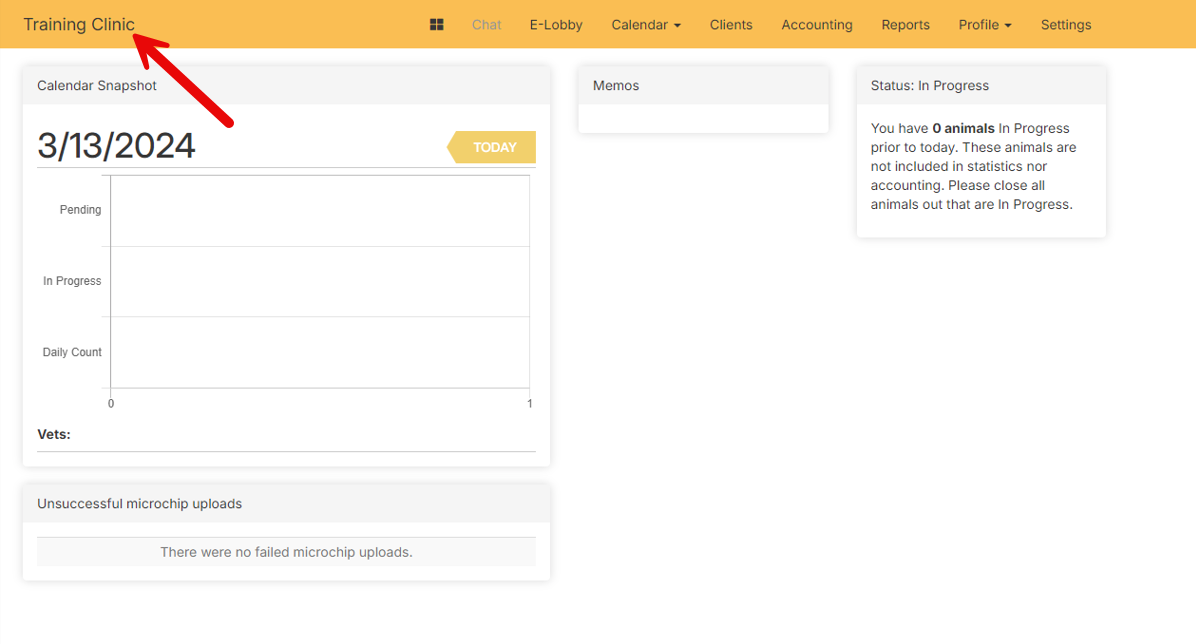
The training site looks exactly like your clinic’s own HQ site, with two key differences:
- The name Training Clinic appears in the upper-left corner instead of your clinic’s name.
- The site is bordered in yellow, instead of the standard CHQ Blue.