1.2. HQ Uses Google Chrome
1.2.7. Pinning a Tab
Pinning a tab keeps a website open in a small, fixed spot in your browser for easy access. Pinned tabs stay open even if you close other tabs, making it quick to return to your most-used pages.
Pinning a tab keeps a website open in a small, fixed spot in your browser for easy access. Pinned tabs stay open even if you close other tabs, making it quick to return to your most-used pages.
Why It’s Helpful
Throughout the workday, you may want several HQ pages open at once — for example:
- One tab for the calendar.
- Another for checkout.
- Another for accounting.
Pinning these tabs makes it easy to keep them available while freeing up space in your browser.
How to Pin a Tab
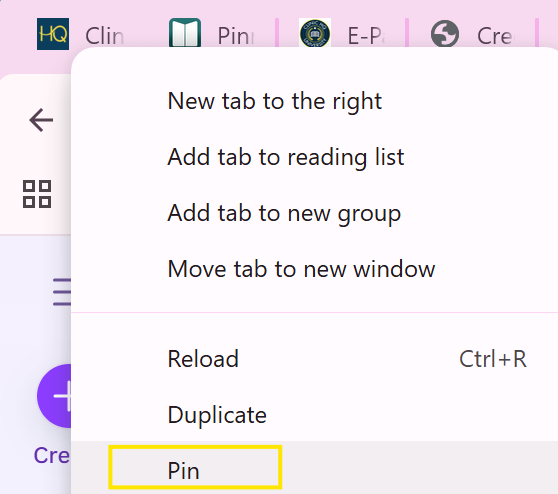
- Right-click on the tab you want to pin.
- Select Pin from the menu.
- The tab will shrink and stay fixed to the left side of your browser
1.2.6. Using Multiple Tabs
During the workday, having multiple HQ tabs open makes it easy to switch between tasks without losing your place.
1.2.8. Creating a Shortcut to HQ
An internet shortcut is a quick link to a website or webpage. Saving one to your desktop or browser allows you to open the site with a single click.