3.2. Wellness Calendar
3.2.1. Managing the Wellness Calendar
The appointment hours for wellness services are controlled by Wellness Rooms.
The appointment hours for wellness services are controlled by Wellness Rooms.
If your clinic’s wellness services do not follow the same schedule as spay/neuter services, or if you want different hours on different days, you will need to adjust the Wellness Calendar directly.
Opening and Closing Days
- The Spay/Neuter Calendar controls overall clinic operation days.
- If a day is closed on the Spay/Neuter Calendar, it will also be closed on the Wellness Calendar.
Open a Day for Wellness Only
Scenario: You want to open a day just for Wellness/Vaccine Clinic, not for spay/neuter.
- Go to the Spay/Neuter Calendar and open the day.
- Click the day and select Adjust capacity for today only.
- Zero out the surgery capacity and save.
- (Optional) Click the day again and add a note indicating it is for wellness only.
Open a Day for Spay/Neuter but Not Wellness
Scenario: You want surgery appointments available, but no wellness services.
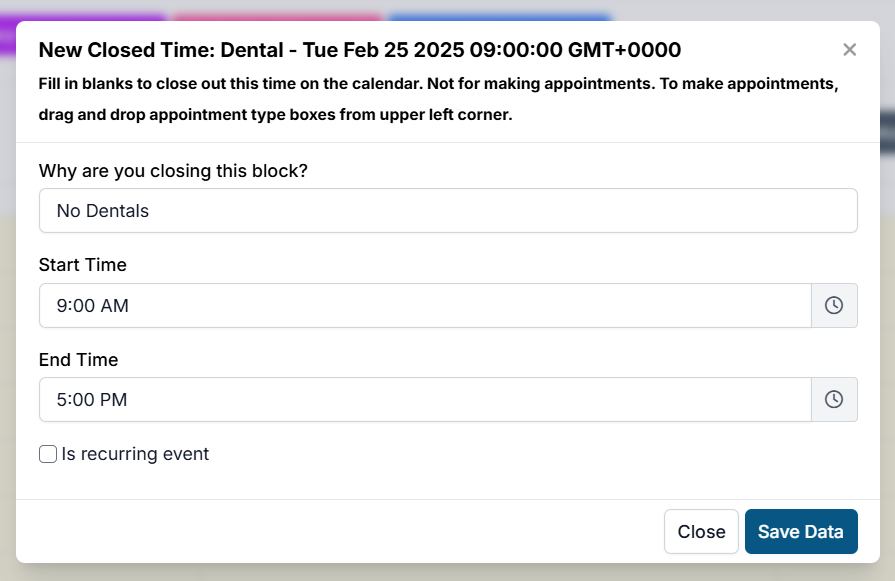
- Create a Closed Block on the Wellness Calendar:
- Go to the Wellness Calendar.
- Click an empty space on the timeline under a room.
- In the pop-up, enter:
- Reason for closing.
- Duration of the block.
- Whether it should repeat.
Removing a Blocked Time
To remove a blocked time:
- Click the blocked reason on the calendar.
- Click Delete.
If the block is recurring, you will be prompted to choose:
- This event – Deletes the block from this day only.
- This and future events – Deletes the block from this day and all future days.
- All events – Deletes the block from all past and future days.