3.3. Mobile Locations

Managing the mobile unit schedule can be challenging when your clinic location changes often, but HQ makes it easier with Mobile Scheduling.
For example, if your mobile unit visits different locations throughout the week, HQ allows clients to select and schedule appointments based on location and availability.
Location Scheduler
To enable and set up mobile scheduling:
- Go to Settings > Clinic Profile > Preferences.
- Enable Mobile Locations and click Save.
- A Mobile Locations page will now appear under Settings > Scheduling.
- To add new locations:
- Go to Settings > Mobile Locations > +Create Mobile Locations.
- Fill in the name and address.
- Mark the type of location.
- Enable/disable it for online scheduling.
- Add a status if needed.
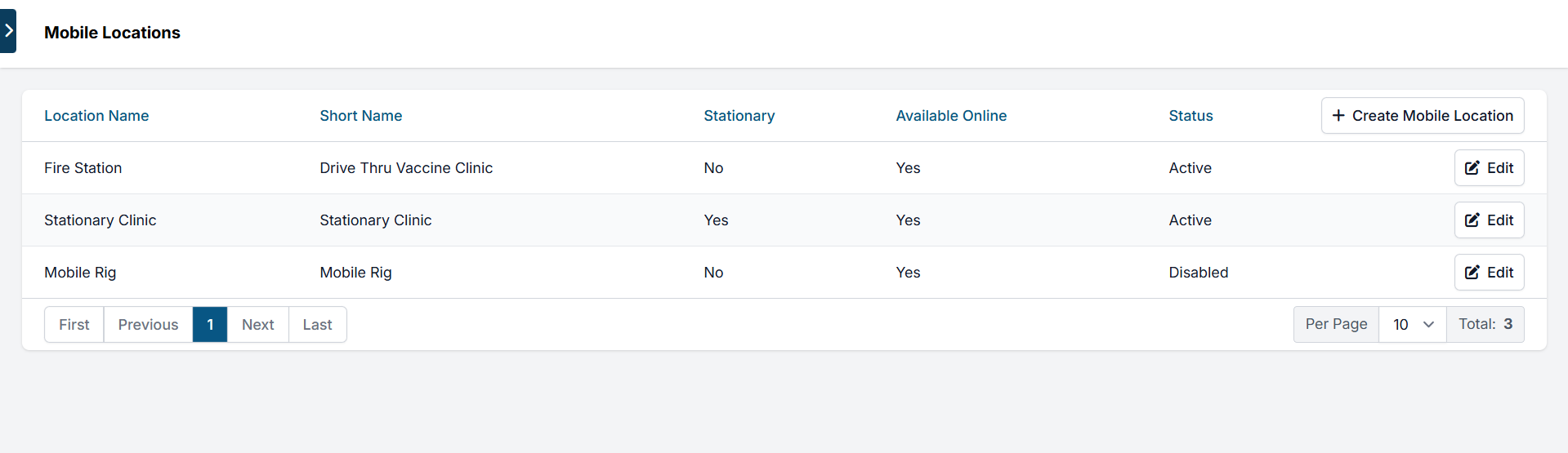
Editing Mobile Locations
To assign a mobile location to a specific day:
- Go to the Calendar.
- Click the desired date.
- Select Adjust mobile locations for today.
- In the pop-up, choose the location and click Add.
- You can set it to repeat weekly.
- You can also add multiple locations for the same day.
When multiple locations are added, each appears as a link on the calendar with its appointment count.
✅ Pro Tip: If a location is marked as Stationary, it will automatically appear on every open calendar day. Stationary locations cannot be removed from individual days.
Clicking a location link shows that day’s appointment summary for that location only. From here, you can:
- Edit the staff note (click Edit)
- Create a new appointment for that specific location
Adjusting Capacity
Capacity settings work differently for mobile scheduling:
- In the standard Spay/Neuter Calendar, capacity is tied to animal type and tiles.
- For* mobile locations*, the capacity is shared across all locations on the same day.
Example:
- Main clinic capacity = 20 appointments
- Mobile unit capacity = 10 appointments
- For that day, set the daily capacity to 10.
✅ Pro Tip: If you have multiple mobile locations on one day, they will share the same capacity. You cannot assign separate capacities per location.