3.4. Troubleshooting

If you’re experiencing calendar issues, start by reviewing your settings to ensure everything is configured correctly. Troubleshooting often begins with the basics before diving deeper.
Common Issues:
Calendar Doesn’t Add Up
Sometimes the calendar doesn’t appear to balance correctly. This usually comes down to capacity or setup conflicts.
Check for these issues:
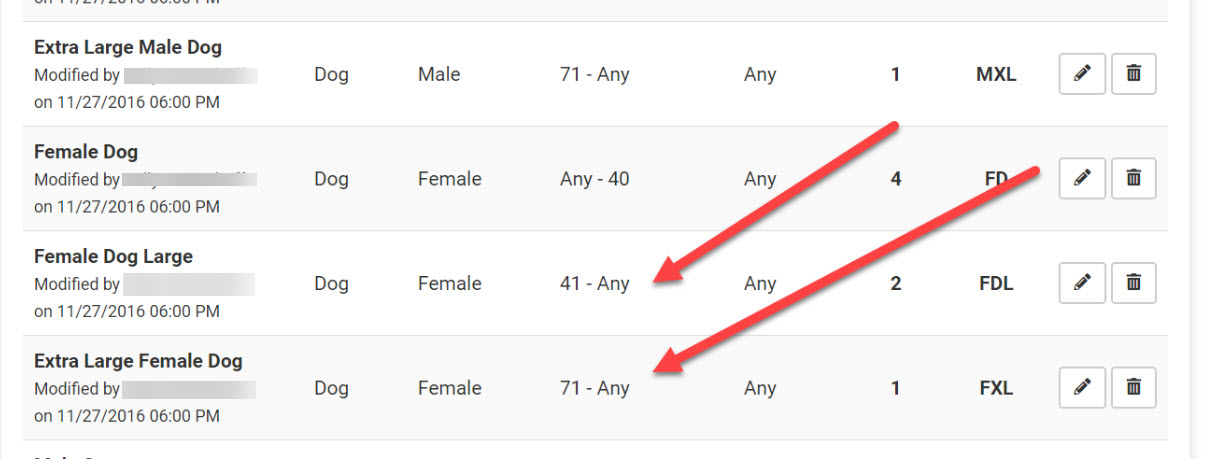
- Overlapping weight ranges – Ranges must not overlap. Example: ** Correct: Female dogs 2–20 lbs, next range starts at 21 lbs ** Incorrect: 2–20 lbs followed by 20–40 lbs (animals at 20 lbs appear in both tiles).
- Open-ended weight ranges – Avoid using “ANY” as it can duplicate animals.
- Mismatched animal types – Example: restricting a tile to Owned animals but scheduling an appointment as "Foster". ** To check: Run a custom report for animal types. If you see types that don’t have a matching calendar category, the appointment becomes “orphaned.” ** ✅ Pro Tip: It’s often best to set tiles as Any to avoid mismatches.
- Volume client portal changes – If a client updates an animal type (e.g., from Owned to Shelter), it may cause an appointment to orphan.
Appointments Not Offered Online
You may see open slots internally, but clients are not offered them online.
- This happens when the overall day is at or above capacity.
- Example: Your total daily limit is 30 appointments (male cats, female cats, male dogs, female dogs). Overbooking a category can push the day to full capacity, blocking it online. ** Fix: Rebalance by transferring appointments across categories to free up space.
E-Appointments
E-Appointments for public clients use species, sex, weight, and animal type to determine available dates/times.
If no dates or times appear, the cause may be:
- Spay/neuter capacity
- Mobile location settings
- Priorities
- Date search range
Closed Holidays
Clinic HQ automatically closes U.S. federal holidays for scheduling. If your clinic will remain open, you must manually re-open the day in the Spay/Neuter Calendar.
Auto-Closed Holidays:
- New Year’s Day (January 1)
- Memorial Day (Last Monday in May)
- Independence Day (July 4)
- Labor Day (First Monday in September)
- Thanksgiving Day (Fourth Thursday in November)
- Christmas Day (December 25)
Auto-Open Holidays:
If your clinic will close on these days, you must mark them as closed:
- Martin Luther King, Jr. Day (Third Monday in January)
- Presidents Day (Third Monday in February)
- Juneteenth (June 19)
- Indigenous Peoples Day (Second Monday in October)
- Veterans Day (November 11)