24.17. Wellness Settings
24.17.1. Appointment Types
Wellness Appointment Types
If your clinic provides any services to animals that do not involve spay/neuter surgery, those services would be scheduled as a Wellness appointment. The Wellness appointment is a broad category that can include sub-types.
Examples of Appointment Types are:
- Vaccine Clinic
- Dental
- Wellness Exam
- Surgery (non s/n)
- Medication Pickup
Create an Appointment Type
- Go to Settings > Wellness Settings.
- Click the +Add New button.
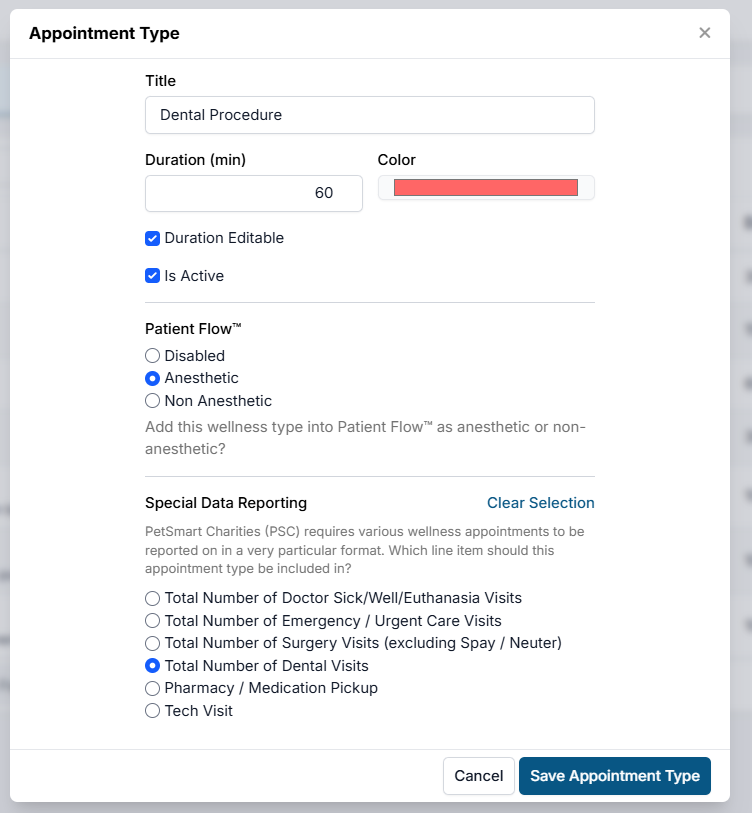
- Title: Name of the appointment type. This is client-facing and viewable from the Wellness Calendar.
- Duration: Frequency of appointments for this appointment type. This determines the amount of appointments available in a room. For example, if your wellness room is open for 5 hours and want to book 20 appointments, the duration should be set to 15 minutes. If you set the duration to editable, staff can internally extend or shorten the appointment time.
- Color: Color-coding for this appointment type. Both client and internally facing. Important: Do not leave the color white. The appointment title text is white, so it would be unreadable.
- Patient Flow: Determine if the appointment type should be available in Patient Flow. It can be assigned to Anesthetic or Non-Anesthetic. Anesthetic are for any appointments that need controlled substances drugs logged. Non-anesthetic appointments do not follow a sedation protocol. Individual appointments can be pushed from one type to the other without changing settings. If set to Disabled, it will not show up in Patient Flow at all.
- Special Data Reporting: Assign particular reporting functions to be compliant with PetSmart Charities grants. Learn how to assign these HERE.
#_ Save Appointment Type.