16.1.3. Idexx Troubleshooting

Troubleshooting IDEXX Issues.
Cannot Create Order Due to Missing IVLS Number.
If the IVLS number does not appear, the issue is always one of the following.
- VetConnect credentials entered in Clinic HQ are incorrect or have been updated.
- The VetLab station is not linked to the VetConnect account used in Clinic HQ.
- The VetLab station settings are not configured to receive communication.
Review credentials in Settings and then IDEXX Setup. If needed, contact IDEXX Support for assistance.
Invalid Order Error.
In rare cases, clinics may receive the following error when creating an order.
Invalid order, see data for field level details, Lab service is not orderable.
This error indicates that the test is either no longer offered by IDEXX or has been blocked within the clinic’s IDEXX account.
To rule out blocked tests, follow these steps.
- Go to Settings.
- Select Integrations.
- Select IDEXX Setup.
- Click Unblock All Tests.
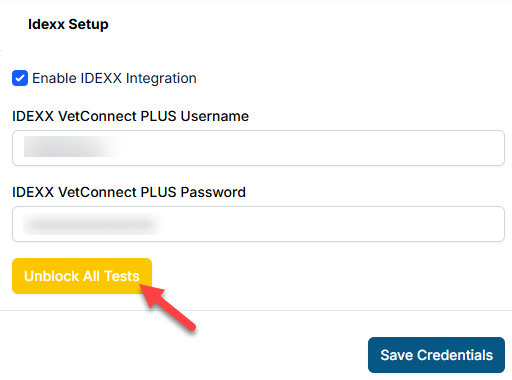
If the error persists, contact your IDEXX representative to confirm test availability or obtain the correct test code.
Contacting IDEXX Support.
Clinic HQ is unable to join calls with IDEXX as we have very limited control over what can be adjusted on the HQ end of things. The only required input in Clinic HQ is entering VetConnect credentials in Settings > IDEXX Setup.
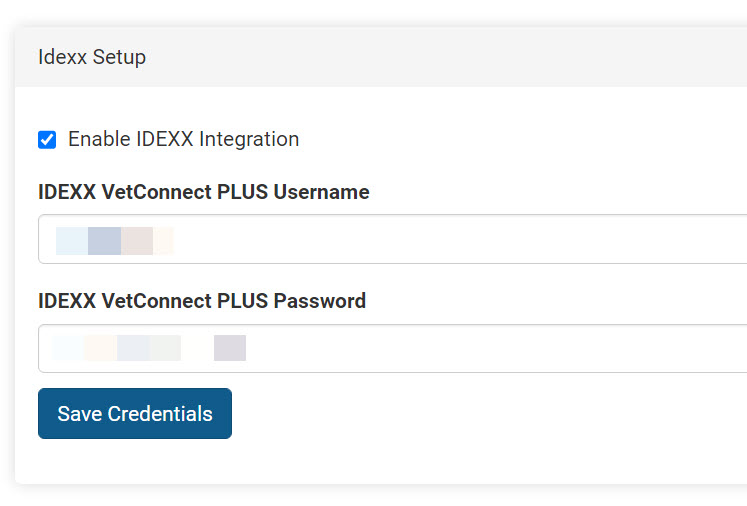
If issues continue after working with IDEXX Support, contact Christopher Stuebing at christopher-struebing@idexx.com for further assistance.