16.1.1. Ordering Tests

IDEXX Integration Overview.
Clinic HQ partners with IDEXX to support both in-house and send-out laboratory testing.
This integration allows clinics to connect directly to their IDEXX account to submit tests and automatically upload results into appointment records.
Benefits include time savings, reduced errors, and direct staff access to laboratory results within Clinic HQ.
Clinic HQ integrates only with IDEXX for laboratory testing.
You can order tests and view test results directly within Clinic HQ.
To enable the IDEXX integration, follow the setup instructions in this section:
IDEXX Setup
Adding IDEXX Tests to an Appointment.
To order an IDEXX test, the correct service line item must first be added to the animal’s appointment.
Service naming requirements.
- Send-out test services must begin with IDEXX ### followed by the test name.
- In-house test services must begin with IDEXX VetLab followed by the test name.
These service items can be enabled for your clinic in Services and Products.
If you cannot find the specific test you are needing, submit a new item request and include the test name and number.
Creating the Order.
Although IDEXX service items can be added in multiple areas of Clinic HQ, orders can only be submitted from Checkout.
- Open or edit the appointment.
- Navigate to Checkout.
- Select the IDEXX tab.
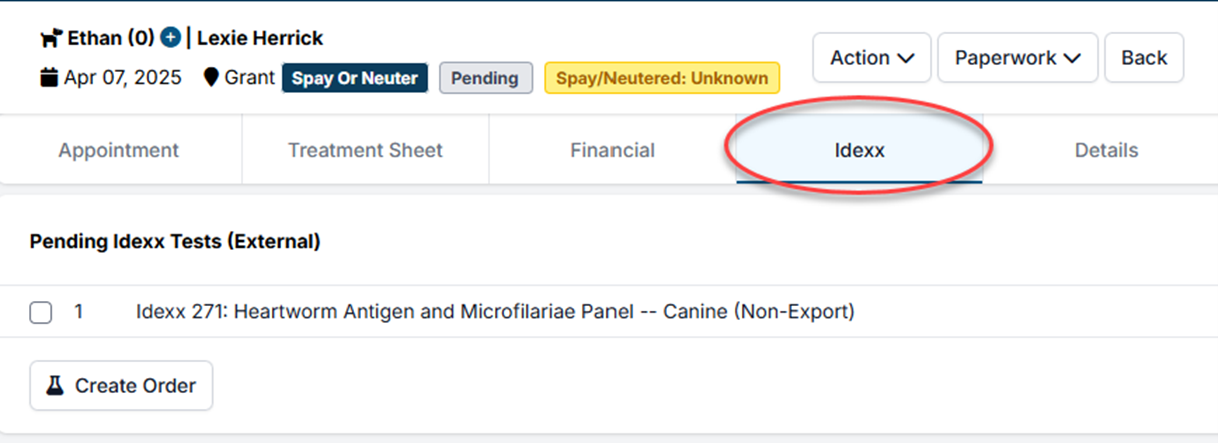
Send-Out Tests.
Send-out tests are tests that are completed externally by IDEXX.
- Add the appropriate IDEXX send-out service to the appointment.
- In Checkout, click Create Order.
A PDF requisition label will be generated.
Print the label and include it with the testing sample.
All send-out test service names begin with IDEXX ###.
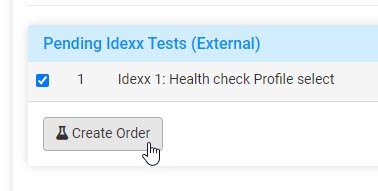
In-House Tests.
In-house tests are processed using IDEXX VetLab equipment.
- Add the appropriate IDEXX VetLab service to the appointment.
- In Checkout, select the test and click Create Order.
- Choose the correct VetLab station identification number or IVLS# from the dropdown list.
If your clinic has multiple VetLab stations, ensure the correct destination is selected.
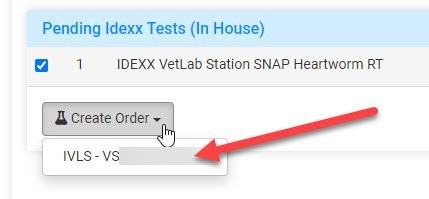
Once the order is successfully submitted, the test status will display as Submitted.
A timestamp and the user who placed the order will also be recorded.
The IDEXX test must be submitted before the appointment can be checked out.
Test results do not need to be available at checkout, but the order must be placed.