How To Discount Things
13.3. Employee Discounts

How To Create In-House Discounts
An in-house discount is a type of subsidy that is applied to services without using grant funding or invoicing a third party.
Common examples include employee discounts, military discounts, or in-house shelter discounts.
Setting Up an In-House Discount.
Creating the Funding Partnership:
- Open Settings.
- Select Funding Partnerships.
- Select Create New Partnership.
- Create a pre-paid funding partnership titled with your clinic name.
- Click Save.
- Edit the partnership and select Adjust Grant.
- Enter $1 in the add or subtract amount field.
- Enter Pot Activation in the transaction description field.
- Select No for including the amount in financial reports. This amount is not recorded in reconciliation since no money was collected.
- Note: This one dollar will never be added to or removed. The presence of this amount activates the funding pot. If the pot balance is zero, the system will not allow the subsidy discount to be applied to services.
Creating the Subsidy:
- Open Subsidies.
- Select Create New Subsidy.
- Enter the discount name as the subsidy title, such as Employee Discount or Military Discount.
- Link the subsidy to the funding partnership you just created.
- Click Save.
Configuring Discounted Items.
After saving the subsidy, configure the services it will discount.
- Open the Items the subsidy covers tab.
- Use only the Client Discount column.
- Enter the discount amount for each applicable service.
- Leave Pot Deduct set to 0.
- Leave the New Service Price field alone.
- Click the plus icon to save and activate each discounted item.
- Repeat for each service your clinic offers an in-house discount on.
- Note: Because Pot Deduct is set to 0, funds will never be added to or removed from the funding partnership pot.
- Example: If Cat Spay is $55 and the employee discount is 20 percent, enter a client discount of $11. Percentage-based discounts must be manually calculated for each service. Automated percentage discounts are not currently supported.
Applying the Discount.
Edit the appointment services.
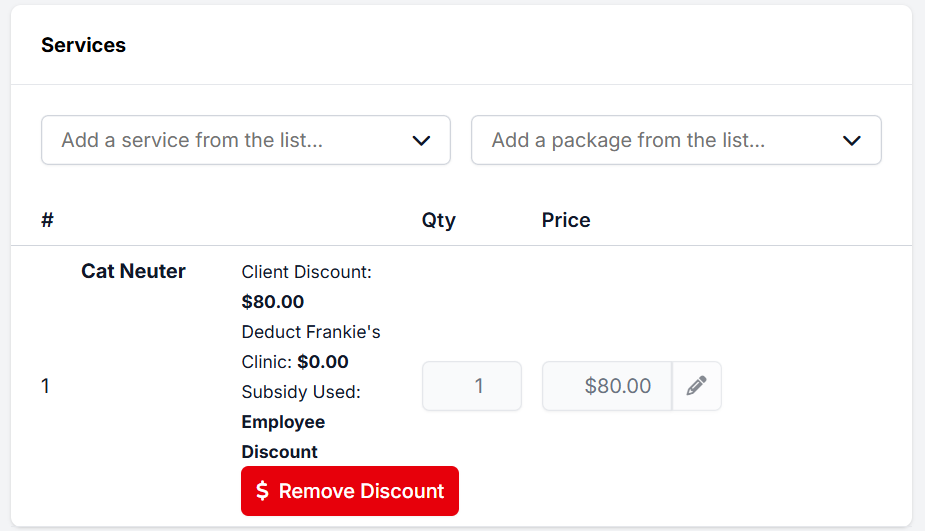
Next to each service item, click the green Discount button.
Select the in-house discount and click Apply.