8.1. Canceling Appointments
8.1.2. Canceling Advanced Wellness Appointments
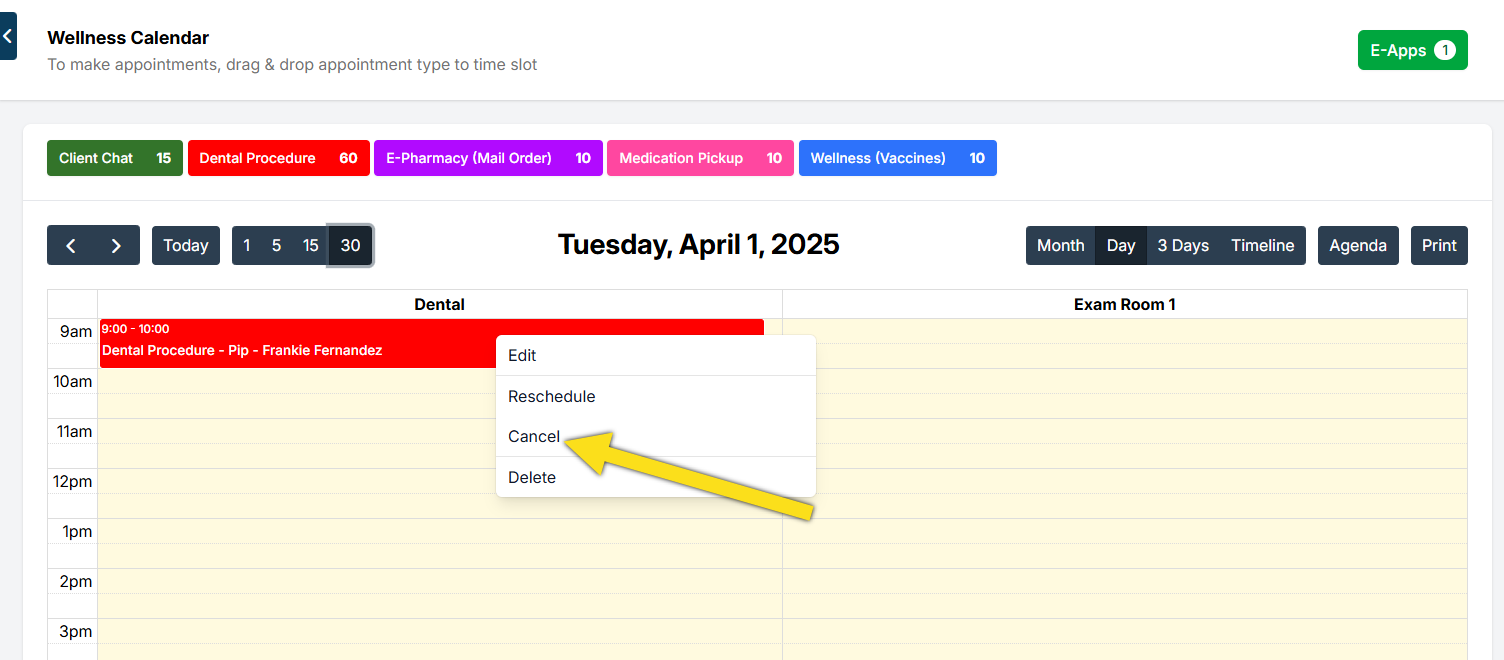
Wellness is handled from a different calendar. To cancel wellness appointments,
Wellness is handled from a different calendar. To cancel wellness appointments,
- You go to the Wellness Calendar.
- Click on the appointment and click Cancel.
✅ Pro Tip: If the appointment has a deposit on it, you'll need to deal with the deposit first. To learn how, go HERE
8.1.1. Canceling SN, Basic Wellness & Recheck
These three appointment types can all be canceled using the same process.
8.1.3. Canceling an Appointment with a Deposit
You cannot cancel an appointment while a deposit or payment is still attached. The deposit must first be repurposed, refunded, or deleted.