11.4.5. Patient Flow How-To's
11.4.5.11. Adding Other Controlled Substances to Patient Flow
Logging the Drug in Patient Flow
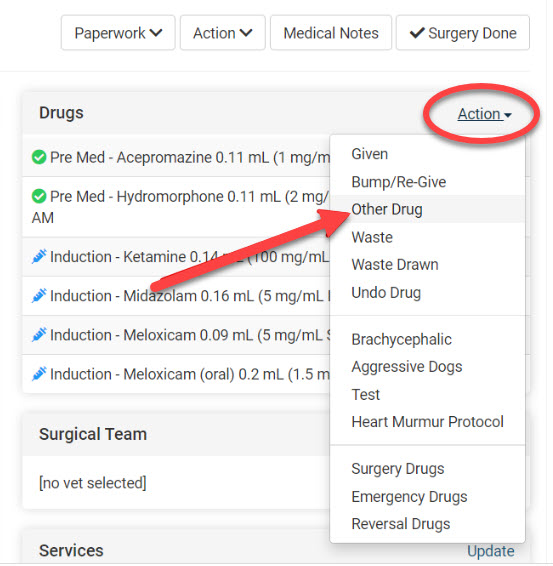
- Using the Drug Action menu, choose Other Drug.
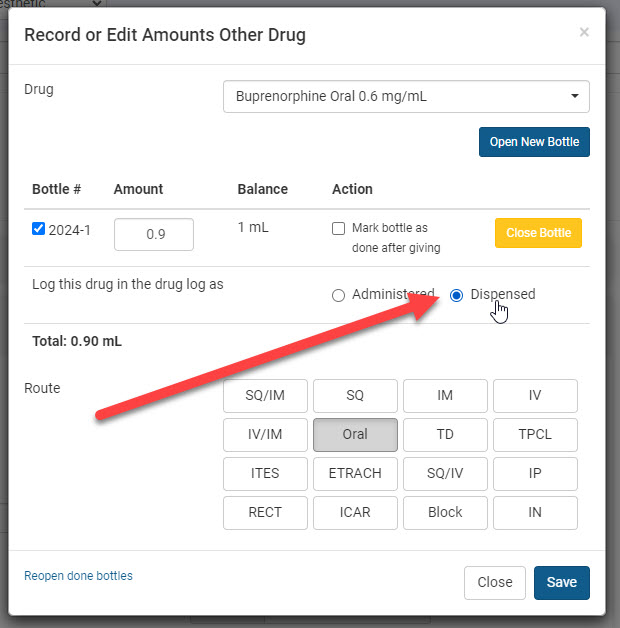
- From the pop-up window, select the drug from the dropdown menu. If it is controlled, you will be required to choose the bottle used and the total amount dispensed. There should be a blue check next to the bottle number being drawn from.
- Mark "Dispensed" for the prescribed controlled drug. This indicates the animal has not received the drug while in the clinic. On the animal's drug list, it will show a syringe icon versus a green check indicating administered.
- Click the route of administration and Save.