12. What To Do At The End of Your Day

Ensuring Public Clients Are Paid by End of Day
It is important that all public clients pay for all services by the end of each day. HQ provides a quick and easy way to verify payments and ensure nothing is missed before closing.
Review and Apply Payments for Public Clients
Use the Public Clients page to apply payments and confirm that all accounts are paid.
To access the Public Clients page:
- Open Accounting.
- Select Public Clients.
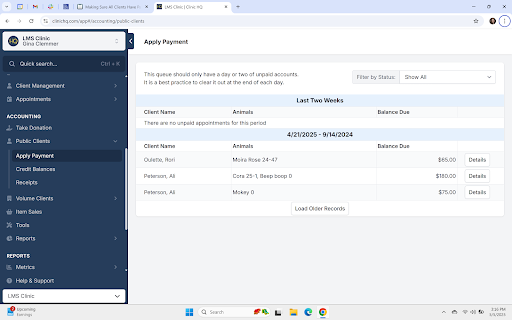
- Open the following page: https://app.clinichq.com/accounting/public-clients
On this page, you can both make payments and verify payment status.
- If no clients appear on the page, all public clients are fully paid.
- If clients are listed, one or more animals still have outstanding balances.
Make a Payment for Public Clients
To apply a payment:
- Click the Details button for the client.
- Select the animals to apply payment to.
- Choose a tender type.
- Click the Make Payment button.
All public clients should be fully paid by the end of each business day.
In the example below, three clients have animals with outstanding balances:
Reconcile your Drawer for Cash, Checks and Credit Cards
- Run the Reconciliation Report in HQ
- Look at the totals at the top of this document and match those to the following:
- Cash (by counting the cash you took in that day)
- Checks (by totaling the value of checks)
- Credit Cards (by tallying the credit card receipt copies)