24.9.2. Shelterluv Add On Setup
24.9.2.1. Shelterluv Add On Cancelation
How to Cancel
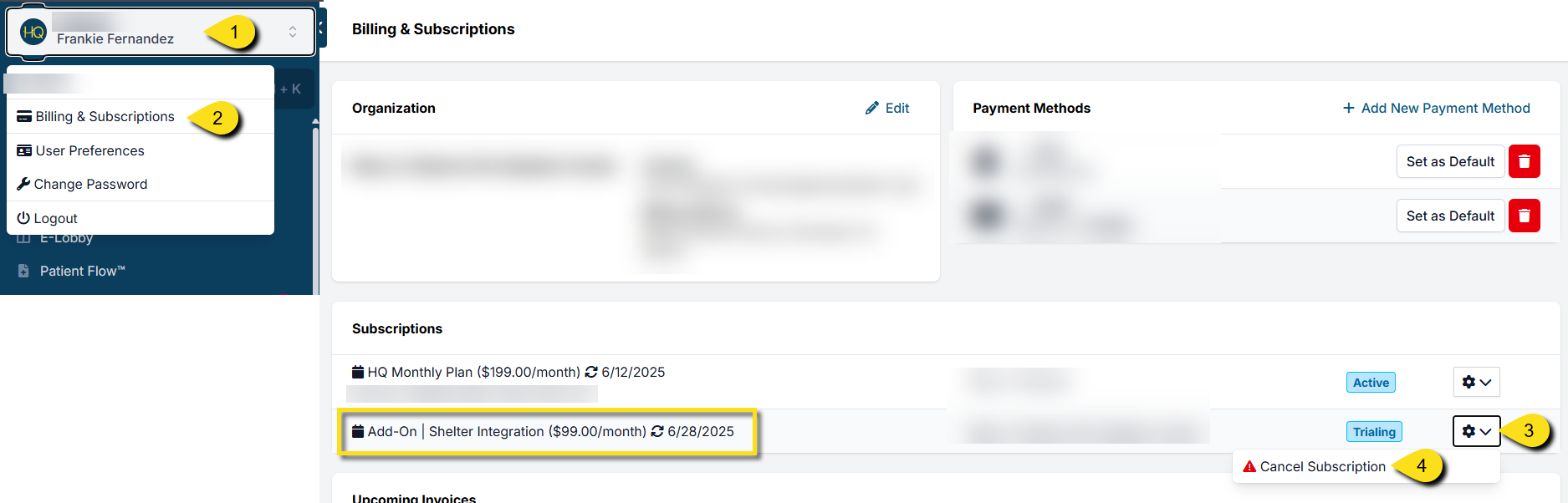
In the event you need to cancel your Shelterluv add-on subscription, this can be done from Profile > Organization & Billing.
Here are the steps to do that:
- Click on the white user profile box at the top of the left-hand navigation menu.
- Click Organization & Billing
- Find the subscription "Add On - Shelter Integration". Be cautious that you have the right subscription selected.
- Click the gear icon, then click Cancel Subscription.
Please note that the 30-day trial can only be redeemed once. You will not be able to trial the add-on if you decide to enable the integration again.