16.2.2. 24PetWatch Microchips
24PetWatch
Ordering 24PetWatch Chips
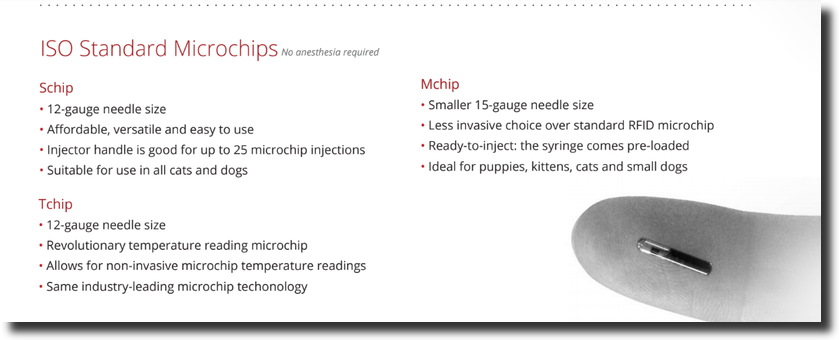
There are various kinds of microchips. Please contact 24PetWatch for pricing details.
Schip
Mchip
Tchip
To order, call: 1.866.597.2424 or email: microchips@pethealthinc.com and let them know you are a Clinic HQ client in order to receive the discount. You can order as many as you like or as few as 100 chips to start.
Auto-Registration for 24PetWatch
Enable Auto-registration for 24PetWatch chips in Settings > Microchips For public clients with 24PetWatch microchips, HQ will auto-register after they are checked out in HQ. It will also auto-register volume client owners. HQ will NOT register volume client chips where no volume client owner is present.
Microchips are entered on the animal tab in checkout. For all chips other than 24PetWatch, simply enter the chip maker and the microchip number. They will not be automatically registered. They are searchable within your HQ database after saving.
With 24PetWatch, the chip is auto-registered, and as a part of that registration, you’ll need the owner’s consent. Owner consents relate to the owner's willingness to be contacted by PetHealth, the owner of the 24PetWatch registry. These consents have been keyed into the microchipping section on the animal tab and are present when the chip type is 24PetWatch.

If the consent is not answered, you will not be able to checkout the appointment. A reminder/warning will be given that states: You need to record the owner consent or decline to receive electronic messaging (Treatment Sheet Tab.)
Please update the microchip number to access the 24PW registration consent.
Once the animal is checked out, the chip will auto-register via an upload from HQ to 24PetWatch.
For 24PetWatch chips, a template is available for download It is provided by PetHealth and meant for you to give to owners. To upload it in HQ, go to Settings > Templates and upload there. Then, to run it, go to Clients > Paperwork and select tp print or email it from your custom teplates.
!TIP In 2022, 24PetWatch took control of Found Animals. Even though this merge occurred, Clinic HQ does not auto register Found Animals microchips.
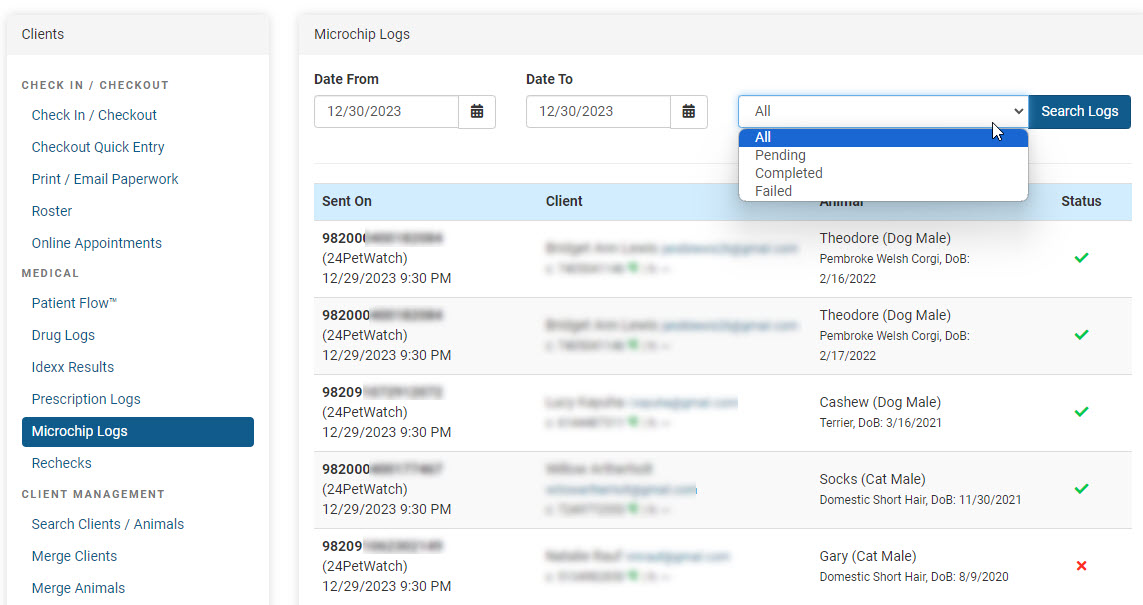
Microchip Log for Auto-registration
The log is found in the Clients section of HQ. Here, you can search by appointment date to make sure there were no errors. If you hover over the red x, it will tell you the reason for the error. You can correct the error in checkout and click “revise checkout,” and the information will be resubmitted to the registry.
Microchip Exports For Found Animals
For Found Animals, we have an export available in Reports > Microchips where you can export and upload to Found Animals. We do not set up the ability to upload to Found Animals. You will need to contact your Found Animals service report to learn how to upload it to their registry.
!IMPORTANT Per Found Animals new site my24pet.com Help section they indicate that batch upload has not changed. "I used Dropbox or software to register pets with Found Animals. What happens now? If you were previously setup with batch uploads, then you do not need to do anything different. Email clientcare@pethealthinc.com if you have any questions about this process."