18.5. The Medical Record
18.5.2. Rabies Certificates
Get Rabies Ready: Generate Your Pet’s Pawsport!
Pet owners may need a rabies certificate when traveling, visiting veterinary facilities, or following local regulations.
- How to generate a Rabies Certificate in HQ
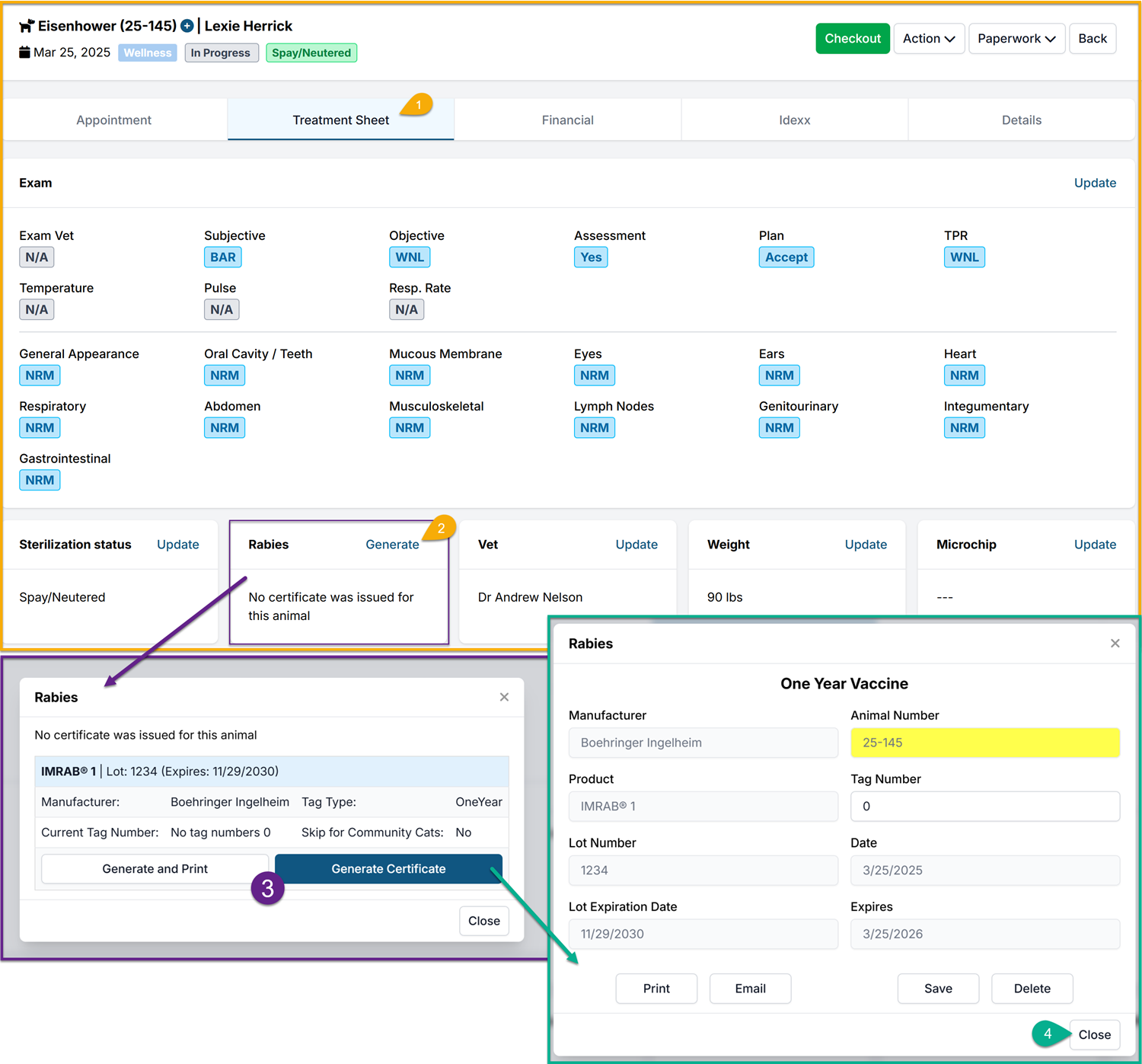
After adding the proper Rabies Service Item to the appointment, you will be able to Generate the Certificate. Follow these steps:
- Navigate to the Treatment Sheet tab
- Select Generate in the Rabies section
- Select Generate and Print or Generate Certificate on the appropriate lot that was administered
- This will pull the information that was entered in the Vaccine Setup including: Manufacturer, Product, Lot Number, Lot Expiration, Tag Type and Tag number (if used) and the Vaccine Duration/Expiration
#_ Once the the Rabies popup appears, the Certificate is created. From this page you can Print or Email the certificate. If any changes need to be made, you can Edit/Save the data or even Delete the Certificate.
- If no further action is needed, you can simply close out of this page.
Note: Before a Rabies Certificate can be generated, you will first need to setup the rabies vaccine(s) under Settings. You can read more about how to do that HERE