24.28.2. Donated Admin Fee (DAF)
What You Should Decide Before Enabling It
To make the most of this new feature, we recommend your team discuss and decide on the following:
- Whether your clinic will use this tool
- What percentage fee you’ll set – We recommend starting at 3.5%
- Whether to offer it to both public and volume clients
- Exceptions to the fee – Staff can manually remove the fee on internally created appointments (e.g., when clients pay by cash)
- Refund policy – Decide whether you will refund the admin fee when issuing refunds (this is optional)
Enabling the tool
- Go to Settings > Donations
- Click Donated Admin Fee
- Click "Percentage of the total transaction amount" button
- Type in an amount. We suggest 3.5%. Type in 3.5 into the field.
- Select which Grant pot these funds will be added to in HQ. If you don't have a pot setup yet, follow the steps below.
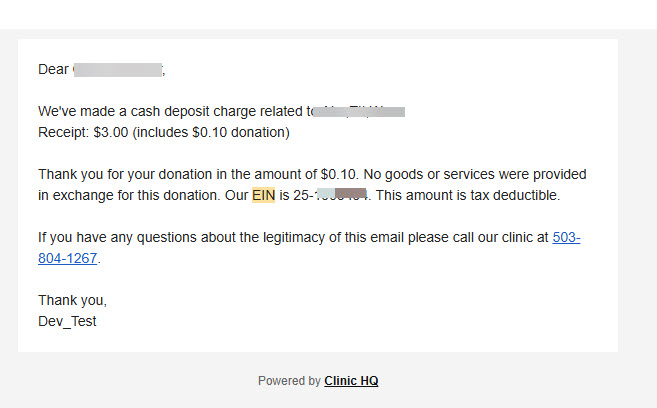
Filling in your EIN so it populates on the auto generated receipts
- Click on your clinic's name in the upper left corner from any page in HQ.
- Go to Organization & Billing.
- In the Business Information section click Edit and fill in your EIN.
Setting up a grant
In HQ, a "grant" can be one of two things -- a holding account (often called a pot of funds) to hold funds in reserve, and if desired, to draw down from those funds. This is what we'll set up here. The other thing a "grant" can be, is an invoiced partnership where your organization uses the grant to subsidize surgeries or other services, and then you invoice another organization. That type of grant is not applicable in this context.
If you haven't already, you'll first need to setup a pot to hold the funds that will be generated from your DAFs.
- Go to Settings > Funding Partnerships.
- Click +Create Partnership button.
- Select *Prepaid *as the option, type a *Title *(name) for the pot and leave the status as Active.
- Click Save in upper right corner. This creates the pot.
What you've done is create a pot to hold the funds in. In real life, the funds are deposited into your bank account, but in HQ, you're keeping track of how much you collect in funds.
If you'd like to draw down those funds in HQ by applying a subsidy, you can read more about how to do that here.
Setting up a tax deductible receipt
It's not necessary for this tool to setup a tax deductible receipt. The client already gets one without you doing anything. It looks like this.