Scheduling
4.13. Scheduler Log
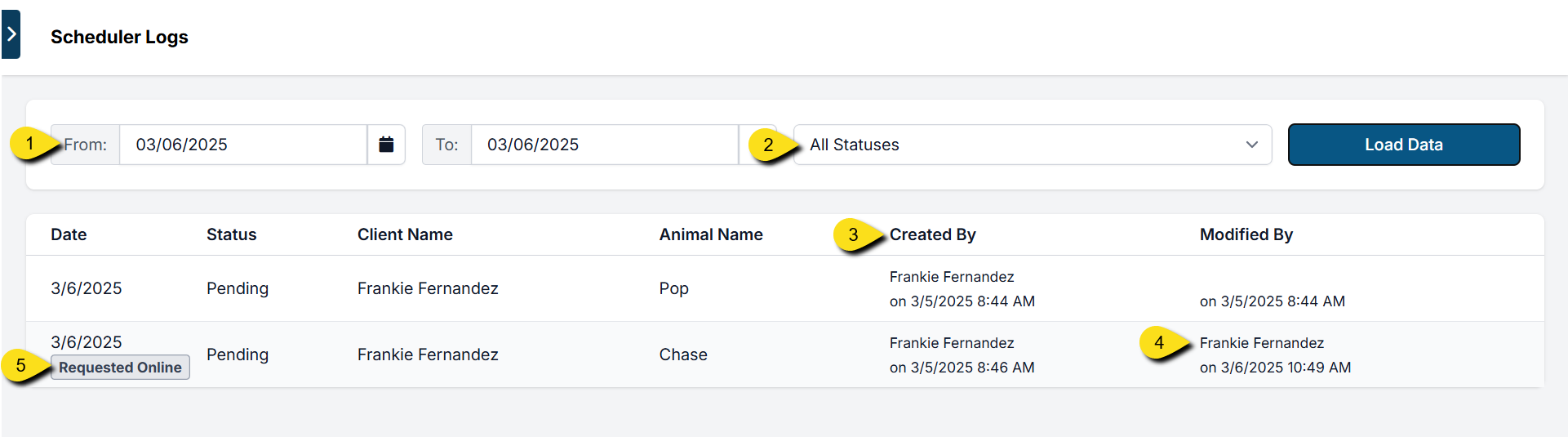
The Scheduler Log tracks all appointment activity. It records:
The Scheduler Log tracks all appointment activity. It records:
- The user who confirmed the appointment.
- The user who last updated the appointment.
This makes it easy to review when an appointment was created or changed, and by whom.
Accessing Scheduler Logs
You can find scheduler logs under: Clients > Appointments > Scheduler Logs
From here, you can filter by:
- Date: Use the date picker to view appointments created on a specific day (e.g., selecting March 6 shows all appointments scheduled that day).
- Appointment Status: Filter by pending, in-progress (checked in), checked out, canceled, or no-showed.
- Created By: Displays the user who confirmed the appointment.
- Modified By: Displays the user who last updated the appointment (changes may include rescheduling, editing details, applying an e-payment request, etc.).
Internal vs. External Appointments
Scheduler Logs also show how the appointment was created:
- Online Request: Marked with an “online appointment request” stamp.
- Internal Booking: If no stamp is present, the appointment was scheduled internally.